Best Gaming Headset for Linux and PC Gaming
The best gaming headset for Linux in 2026: six PC headsets compared on USB audio, HeadsetControl support and battery readout.
Published . Updated . 7 min read.

The best gaming headset for Linux works as a normal audio device the moment you plug it in, and lets you read the battery and set sidetone with open source tools instead of Windows-only apps.
The vendor apps (SteelSeries GG, Logitech G Hub, Corsair iCUE) do not run on Linux, so this guide ranks six headsets by the features listed in the HeadsetControl README on 2 November 2026, plus maker specs. See how we review.
Quick picks
- Best overall: SteelSeries Arctis Nova 7 Wireless Gen 2
- Best value wireless: SteelSeries Arctis Nova 5X
- Best budget: HyperX Cloud III
We may earn a commission if you buy through links on this page. It never changes our verdicts. How we review.
Arctis Nova 7 Wireless Gen 2
Check price on AmazonArctis Nova 5X
Check price on AmazonHyperX Cloud III
Check price on AmazonLinux gaming headsets compared
| Headset | Connection | Works as USB/analogue audio | HeadsetControl features | Battery readout on Linux | Best for |
|---|---|---|---|---|---|
| Arctis Nova 7 Wireless Gen 2 | 2.4 GHz + Bluetooth | Yes | 12 | Yes | Best overall |
| Arctis Nova 5X | 2.4 GHz + Bluetooth | Yes | 11 | Yes | Value wireless |
| Logitech G Pro X 2 Lightspeed | 2.4 GHz, Bluetooth, 3.5 mm | Yes | 6 | Yes | Competitive FPS |
| HyperX Cloud III | USB-C/A, 3.5 mm | Yes | 1 (sidetone) | N/A (wired) | Budget |
| Corsair HS80 MAX | 2.4 GHz + Bluetooth | Yes | 0 (sidetone via ALSA mixer) | Not listed | Comfort, iCUE users dual-booting |
| Drop + EPOS PC38X | 3.5 mm | Yes (analogue) | N/A | N/A | Open-back, no software |
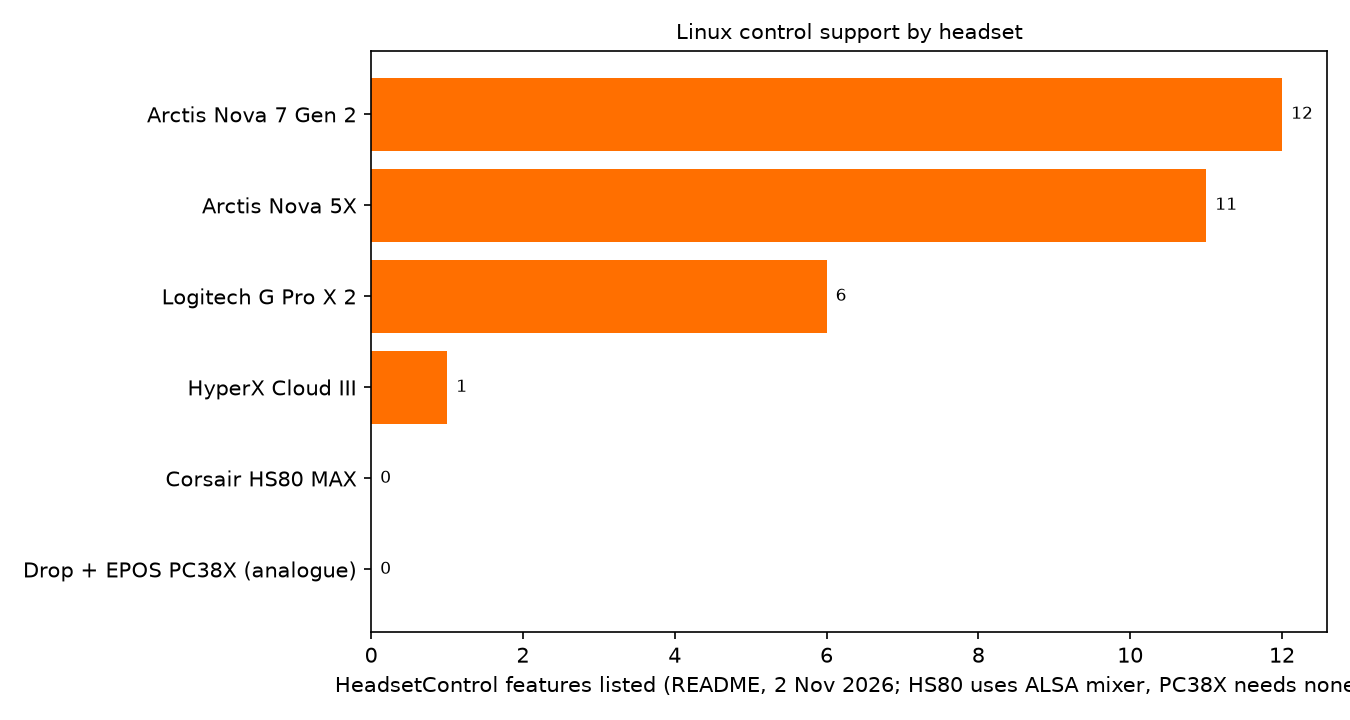
All six work as standard audio devices; the difference is how much HeadsetControl can do.
1. SteelSeries Arctis Nova 7 Wireless Gen 2: best overall
The Nova 7 Gen 2 has the longest HeadsetControl feature list here, 12 items from sidetone and battery to chatmix, EQ and mic LED (HeadsetControl README).
Linux notes
- Standard USB audio through the 2.4 GHz dongle, with Bluetooth as well.
- Battery readout on Linux; sidetone confirmed on the Gen 2 in the README.
- Battery life about 54 hours.
Who it's for
Linux gamers who want wireless audio and full control from the command line.
Who it isn't for
Anyone who needs a wired 3.5 mm connection.
Check price on Amazon2. SteelSeries Arctis Nova 5X: best value wireless
The Nova 5X lists 11 HeadsetControl features, including battery, chatmix and parametric EQ (HeadsetControl README), and has a longer rated battery life than the Nova 7 Gen 2.
Linux notes
- Standard USB audio over 2.4 GHz, plus Bluetooth.
- Battery readout on Linux.
- Rated 60 hours of battery. The 5X adds Xbox support over the plain Nova 5.
Who it's for
Gamers who want nearly the full feature list and long battery life.
Who it isn't for
Anyone who needs the option of a wired analogue connection.
Check price on Amazon3. Logitech G Pro X 2 Lightspeed: best for competitive FPS
The G Pro X 2 Lightspeed connects by 2.4 GHz, Bluetooth or 3.5 mm, and uses 50 mm graphene drivers.
Linux notes
- Standard audio device on Linux.
- 6 HeadsetControl features: sidetone, battery, inactive time, EQ preset, EQ and parametric EQ (HeadsetControl README).
- Up to 50 hours of battery.
Who it's for
Competitive FPS players who prefer wireless audio but want the reassurance of a wired fallback.
Who it isn't for
Anyone who wants chatmix or the longest feature list; the SteelSeries pair list about twice as many features.
Check price on Amazon4. HyperX Cloud III: best budget
The Cloud III is wired, with 53 mm drivers, so there is no battery or pairing to manage.
Linux notes
- USB-C, USB-A or 3.5 mm; standard USB audio on Linux.
- HeadsetControl supports one feature: sidetone.
Who it's for
Budget buyers who want a simple wired headset.
Who it isn't for
Anyone who wants wireless or lots of settings.
Check price on Amazon5. Corsair HS80 MAX: for iCUE users who dual-boot
The HS80 MAX suits players who already use Corsair's software on Windows. Audio works on Linux; extra controls are limited.
Linux notes
- 2.4 GHz and Bluetooth; standard audio on Linux.
- No HeadsetControl features; the README notes HS80 sidetone is set through the ALSA mixer instead (HeadsetControl README).
- No Linux battery readout listed. iCUE and Dolby Atmos are Windows features.
Who it's for
Dual-booters with an existing iCUE setup.
Who it isn't for
Linux-only gamers who want battery readout.
Check price on Amazon6. Drop + EPOS PC38X: open-back with no software
The PC38X is an open-back analogue headset on a 3.5 mm plug. It needs no software at all, so HeadsetControl does not apply.
Who it's for
Players who want open-back sound and zero software.
Who it isn't for
Anyone who needs wireless or plays in a noisy room, since open-back designs leak sound both ways.
Check price on AmazonSetting up a headset on Linux
- Check the system sees it. On a PipeWire desktop, run
wpctl statusand look for the headset under sinks (outputs) and sources (inputs). - Pick the output. In pavucontrol, choose the right profile on the Configuration tab and set the headset as the output.
- Install HeadsetControl. Use your distribution's package if there is one, or build it using the instructions in the HeadsetControl repository.
- Try the basics.
headsetcontrol -breads the battery andheadsetcontrol --helplists what your headset supports.
If the microphone still misbehaves, this Unix & Linux Stack Exchange thread is a useful starting point.
FAQ
Do wireless gaming headsets work on Linux?
Yes. Their USB dongles show up as standard USB audio. Battery readout and extra controls depend on HeadsetControl support for the model.
Does SteelSeries GG or Logitech G Hub run on Linux?
No. Neither runs on Linux, and nor does Corsair iCUE. HeadsetControl covers many of the same settings on supported headsets.
What is HeadsetControl?
An open source command line tool that talks to supported gaming headsets, so you can read the battery and set features such as sidetone without the maker's app.
Does 7.1 surround work on Linux?
Not through the vendor apps, which is where virtual surround usually lives. Expect stereo on Linux unless you set up virtual surround yourself in PipeWire.
Do I need a special kernel or driver for a gaming headset?
No. Every headset here uses standard USB audio or an analogue jack. HeadsetControl is only for extra features.
Our verdict
The Arctis Nova 7 Wireless Gen 2 is the best gaming headset for Linux for most people: the longest HeadsetControl feature list, battery readout and 2.4 GHz plus Bluetooth. The Nova 5X comes close, and the wired HyperX Cloud III is the simple budget pick.
Check price on AmazonFor the rest of your setup, see the gear guides, the best gaming mouse for Linux and open source games.