Best Wireless Mouse for Linux: Picks for Coding and Office Work
The best wireless mouse for Linux for coding and office work: Logitech MX, Lift, M720 and budget picks, with what works over Bolt, Unifying and Bluetooth.
Published . Updated . 8 min read.

The best wireless mouse for Linux for most coding and office work is the Logitech MX Master 4. It connects through a Logi Bolt receiver, while the open-source Solaar app provides battery information and button settings that Logitech's own software only offers on Windows and macOS. For less money, the M720 Triathlon lets you switch between three computers using Unifying or Bluetooth.
This guide is based on the Solaar documentation and supported devices page, the ArchWiki guides to the MX Master and Unifying receiver, Plug and Tux, input-remapper, Linuxano as one named view, and Amazon UK listings. These mice have not been independently tested for this guide. For gaming models, see the best gaming mouse for Linux guide.
Quick picks
- Best overall: Logitech MX Master 4
- Best value flagship: Logitech MX Master 3S
- Best compact and travel: Logitech MX Anywhere 3S
- Best ergonomic vertical: Logitech Lift
- Best multi-device budget: Logitech M720 Triathlon
- Best quiet everyday mouse: Logitech Signature M650
- Best cheap plug and play: Logitech M185
- Skip: gaming mice for office work (see the gaming page) and no-name mice with Windows-only software
We may earn a commission if you buy through links on this page. It never changes our verdicts. How we review.
Best overall: Logitech MX Master 4
Check price on AmazonBest multi-device budget: Logitech M720 Triathlon
Check price on AmazonWhat works on Linux
| Mouse (Amazon UK ASIN) | Connection(s) per listing | Basic input out of the box | Battery level on Linux | Settings and remap tool | Multi-device switching (listing) |
|---|---|---|---|---|---|
| MX Master 4 (B0FHHV6CQK) | Bolt receiver or Bluetooth | Yes | Solaar | Solaar; ArchWiki says haptics not yet in a Solaar release | Up to 3 devices |
| MX Master 3S (B0FHHV6YR5) | Bluetooth; Bolt receiver not included | Yes | Solaar | Solaar, input-remapper | Up to 3 devices |
| MX Anywhere 3S (B07W4DGLY6) | Bluetooth; Bolt only, not included | Yes | Solaar | Solaar, input-remapper | Up to 3 devices |
| Lift (B07W6JLFZ7) | Bolt receiver or Bluetooth | Yes | Solaar | Solaar, input-remapper | Not stated |
| M720 Triathlon (B01KZVQB42) | Unifying receiver or Bluetooth | Yes | Solaar (in its device table) | Solaar, input-remapper | Up to 3 computers |
| Signature M650 (B07W6G822T) | Bolt receiver or Bluetooth | Yes | Solaar | Solaar, input-remapper | Not stated |
| M185 (B0056I3IDW) | Nano receiver | Yes | Not checked (listed in Solaar device table) | input-remapper | No |
Sources: Solaar supports Logitech devices using the HID++ protocol over Unifying, Bolt or Nano receivers, USB or Bluetooth. It recommends running Solaar with the mouse connected to check compatibility. Plug and Tux confirms that basic mouse input works through generic drivers, while input-remapper supports both X11 and Wayland. Last checked 10 November 2026.
Bolt, Unifying or Bluetooth on Linux
- Logi Options+ is not on Linux. The M650 listing says Options+ is available on Windows and macOS. Solaar provides an alternative for pairing, battery levels, DPI and many button settings.
- Bolt and Unifying are not interchangeable. Solaar explains that devices without a Unifying or Bolt logo generally cannot pair with those receivers. A Bolt mouse needs a Bolt receiver.
- Bluetooth works without a dongle. However, Solaar does not manage the Bluetooth connection, so the mouse must first be paired through your desktop's Bluetooth settings.
- Receiver not included. Amazon listings for the MX Master 3S and MX Anywhere 3S confirm that a Bolt receiver is not supplied in the box.
Coding extras
The MX Master range includes a thumb wheel, useful for scrolling sideways through wide files and timelines. ArchWiki lists solaar, logiops and openlogi as options for managing programmable buttons, DPI and SmartShift.
For app-specific button mappings, input-remapper supports most mice on Wayland and X11. The gaming mouse page also covers the full Solaar and Piper setup.
The picks
Logitech MX Master 4: best overall
The MX Master 4 listing highlights a haptic thumb panel, an Actions Ring overlay, MagSpeed scrolling, a USB-C dongle and Bluetooth. ArchWiki reports that pairing with a Bolt receiver just works.
There is a Linux limitation, though. When the ArchWiki page was last edited, haptics and force-sensing controls were available only through Solaar's development branch. Linuxano also places the MX Master 4 first overall.
Who it's for: full-time coders who want every button. Who it isn't for: people with small hands or anyone expecting the haptics to work today.
Check price on AmazonLogitech MX Master 3S: best value flagship
The MX Master 3S offers an 8,000 DPI sensor that tracks on glass, quiet clicks and MagSpeed scrolling. According to the listing, it can connect to up to three Bluetooth devices, and Linux is included among the supported operating systems. ArchWiki also identifies the 3S as a Bolt model.
Who it's for: anyone who likes the MX Master shape but can do without the newest features. Who it isn't for: people without Bluetooth who would rather not buy a separate receiver.
Watch out: on 10 November 2026 the featured offer was sold and dispatched by INSTITUDE BUD, a third party.
Check price on AmazonLogitech MX Anywhere 3S: best compact and travel
The MX Anywhere 3S is a small mouse with an 8K DPI sensor that tracks on any surface and quiet clicks. Its listing confirms Bluetooth support for up to three devices across Linux and other systems.
Logi Bolt is also supported, although the receiver must be bought separately.
Who it's for: laptop users who travel regularly. Who it isn't for: people with large hands or those who want a thumb wheel.
Watch out: on 10 November 2026 the featured offer was sold by AMOAR, a third party.
Check price on AmazonLogitech Lift: best ergonomic vertical
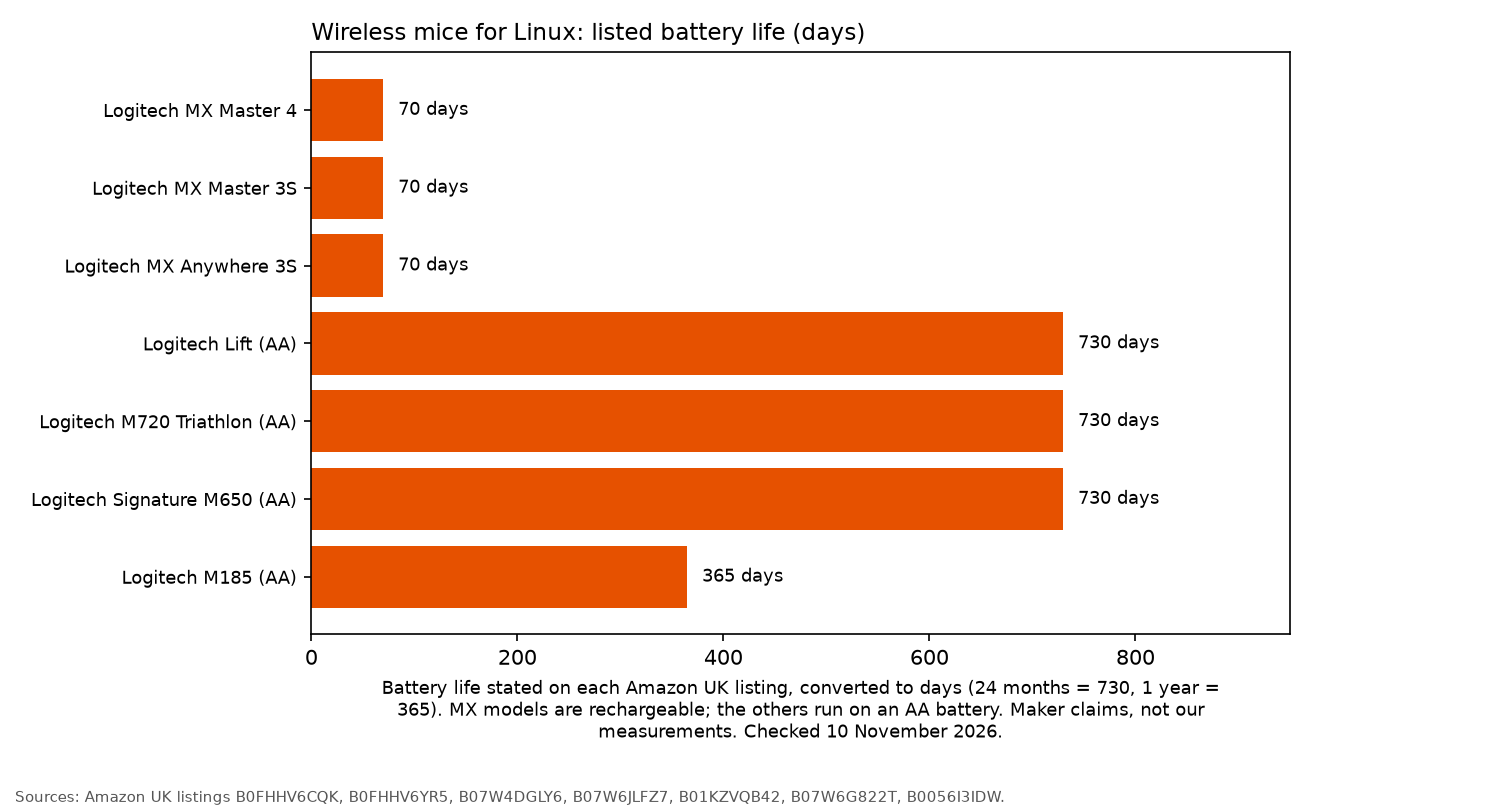
The Logitech Lift has a 57-degree vertical design shaped for small to medium right hands. It also has quiet clicks and a claimed battery life of up to two years.
According to its listing, it connects to Linux and other systems through Bluetooth or Logi Bolt.
Who it's for: long working sessions and sore wrists. Who it isn't for: people with large hands or left-handers considering this version.
Check price on AmazonLogitech M720 Triathlon: best multi-device budget
The M720 Triathlon connects through Bluetooth or a Unifying receiver and switches between up to three computers. Its listing also specifies six customisable buttons, a claimed 24-month battery life and Linux support.
The mouse appears in Solaar's Unifying device table, making it a practical choice for working across several machines.
Who it's for: anyone sharing one mouse between a work laptop, Linux desktop and tablet. Who it isn't for: people with Bolt-only setups.
Check price on AmazonLogitech Signature M650: best quiet everyday mouse
The Signature M650 has SilentTouch clicks and a SmartWheel. It connects through Bluetooth or Logi Bolt and offers up to two years of battery life from a single AA battery, according to the listing.
Linux is also named among its supported systems.
Who it's for: people working in shared offices. Who it isn't for: anyone who wants to switch between several devices at the press of a button.
Check price on AmazonLogitech M185: best cheap plug and play
The M185 is a small, ambidextrous wireless mouse with a nano receiver and a claimed battery life of up to one year from an AA battery.
The listing title and the compatibility bullet name Windows and Mac. The operating system field also lists Linux kernel 2.6+. The M185 is included in Solaar's device table. Solaar cautions that Logitech reuses model names, so checking the receiver ID matters.
Who it's for: a spare mouse or a Raspberry Pi desk. Who it isn't for: anyone spending all day coding.
Check price on AmazonFAQ
Does the MX Master work on Linux?
Yes. The MX Master works as a standard mouse on Linux. Solaar adds battery information and button settings, and ArchWiki explains the setup.
Does Logi Options+ work on Linux?
No. Logitech offers Options+ for Windows and macOS, not Linux. Solaar is the alternative.
Bolt, Unifying or Bluetooth on Linux?
All three work on Linux. Bolt and Unifying receivers cannot be used interchangeably, while Bluetooth connects without a dongle.
How do I see mouse battery level on Linux?
Install Solaar to check the battery status of supported Logitech mice.
Can I remap buttons on Wayland?
Yes. input-remapper supports Wayland. Solaar can also adjust many settings directly on the mouse.
Best ergonomic mouse for Linux?
The Logitech Lift is the ergonomic choice among these picks. It connects through either Bolt or Bluetooth.
More from OpenFrag: Gear · Gaming mouse for Linux · Mechanical keyboard for FPS · Steam Deck accessories (a Bluetooth mouse helps in desktop mode) · How we review