Best Mechanical Keyboard for FPS Gaming, With Linux Notes
The best mechanical keyboard for FPS gaming in 2026, from rapid trigger Hall effect boards to classic switches, with documented Linux setup notes.
Published . Updated . 10 min read.
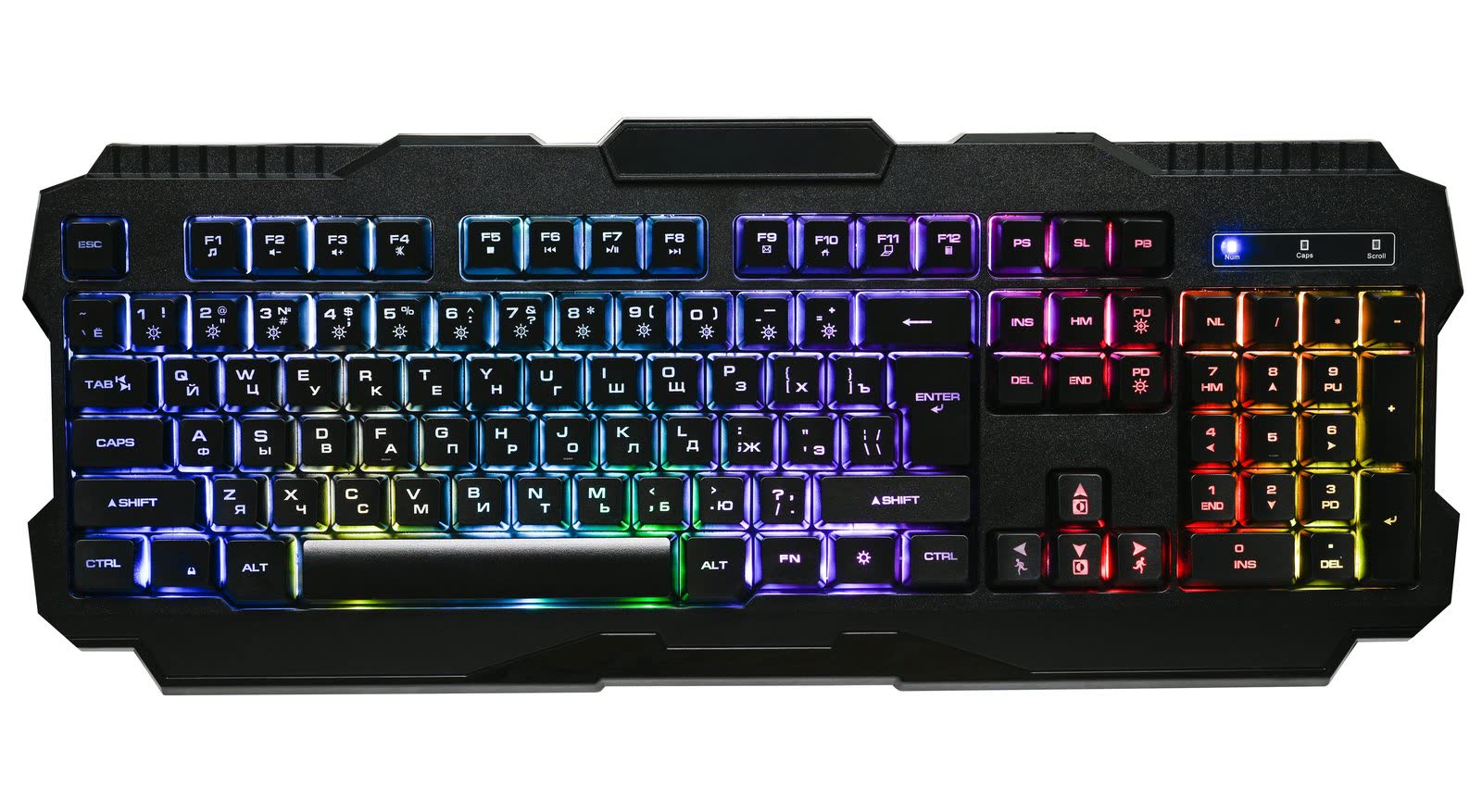
The best mechanical keyboard for FPS gaming in 2026, for most UK buyers, is the Razer Huntsman V3 Pro TKL. If documented Linux setup matters more, the Wooting 80HE is the better choice.
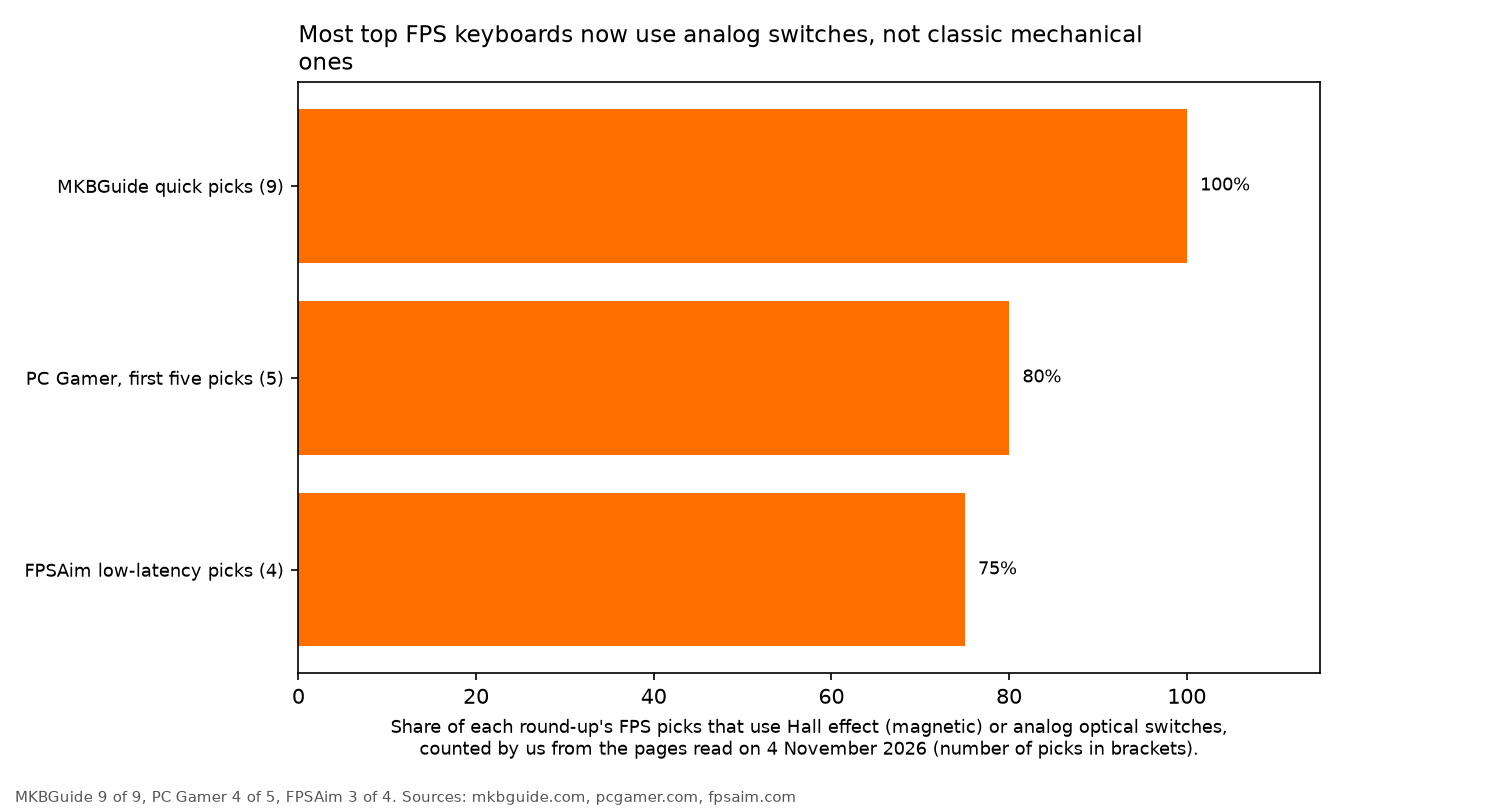
Strictly speaking, most of the top FPS keyboards are no longer mechanical in the traditional sense. They use Hall effect (magnetic) or analog optical switches. These can detect how far a key has been pressed, which is essential for rapid trigger (FPSAim).
We may earn a commission if you buy through links on this page. It never changes our verdicts. How we review.
Best overall rapid trigger: Razer Huntsman V3 Pro TKL
Check price on AmazonBest feature-rich TKL: SteelSeries Apex Pro TKL Gen 3
Check price on AmazonBest 75% and best for tinkering (QMK): Keychron K2 HE
Check price on AmazonBest true mechanical: ASUS ROG Strix Scope II 96 Wireless
Check price on AmazonBest for documented Linux setup: Wooting 80HE, sold by the maker at wooting.io. It is not available to buy on Amazon UK, so there is no button.
Budget note: the DrunkDeer A75 Pro is a popular budget Hall effect board. As of 4 November 2026, Amazon UK search results showed the older DrunkDeer A75, not a current A75 Pro listing this guide could tie to a UK warranty. It is not linked here.
Linux keyboard config table
| Keyboard | Switch type | Rapid trigger | Actuation range | Configurator | Configurable on Linux (documented) | udev rule needed | Who it's for |
|---|---|---|---|---|---|---|---|
| Wooting 80HE (maker only) | Hall effect | Yes | 0.1 to 4.0mm | Wootility (web or app) | Yes, Wooting's own udev guide | Yes (70-wooting.rules) | Linux players who want documented setup |
| Keychron K2 HE | Hall effect (Gateron double-rail magnetic) | Yes | 0.2 to 3.8mm | Keychron Launcher web app, QMK | Not documented by Keychron | Not documented | 75% wireless all-rounder |
| Razer Huntsman V3 Pro TKL | Analog optical | Yes | 0.1 to 4.0mm (FPSAim) | Razer software | Not documented by the maker | Not documented | Rapid trigger TKL on Amazon UK |
| SteelSeries Apex Pro TKL Gen 3 | Hall effect (OmniPoint 3.0) | Yes | 0.1 to 4.0mm (FPSAim) | SteelSeries software | Not documented by the maker | Not documented | Feature-rich TKL with OLED |
| Logitech G PRO X TKL RAPID | Hall effect (magnetic analog) | Yes | Not stated in our sources | Logitech software | Not documented by the maker | Not documented | Logitech users |
| ASUS ROG Strix Scope II 96 Wireless | Mechanical (ROG NX) | No | Fixed | ASUS software | Not documented by the maker | Not needed for typing | Players who want classic switches and a numpad |
| Keychron K5 Max | Low-profile mechanical | No | Fixed | Keychron tools | Not documented by Keychron | Not documented | Low-profile full-size typing plus gaming |
Every keyboard in the table works as a standard USB keyboard for typing. The Linux notes concern changing settings, not basic keyboard use. VIA-compatible boards can also use the Arch wiki hidraw rule on Linux, although there is a security caveat explained below.
Mechanical vs Hall effect vs analog optical for FPS
FPSAim divides keyboard switches into three families: Hall effect (including Wooting Lekker, SteelSeries OmniPoint 3.0 and Razer's analog optical), optical, and traditional mechanical switches such as Cherry MX, Gateron and Kailh.
According to FPSAim, Hall effect and optical switches offer a measurable latency advantage in competitive gaming. They avoid the debounce step required by mechanical switches with metal contacts.
Rapid trigger resets a key as soon as it begins to rise. That means you can stop and strafe again sooner, without waiting for the key to reach a fixed reset point.
It relies on switches that detect how far a key is pressed. The same technology allows adjustable actuation, letting you choose how deep a key must travel before the press registers.
Polling rate also matters, although the gains become smaller at higher rates. MKBGuide points out that 1000Hz polling reports every 1ms. Moving from 1000Hz to 4000Hz makes more difference than moving from 4000Hz to 8000Hz.
The picks
Razer Huntsman V3 Pro TKL
For: players who want rapid trigger in a tenkeyless board with a UK layout. Not for: anyone who needs to change settings from Linux.
The Huntsman V3 Pro TKL uses analog optical switches with rapid trigger. Actuation is adjustable from 0.1 to 4.0mm, according to FPSAim.
MKBGuide chooses the Huntsman V3 Pro TKL 8KHz as its best rapid trigger keyboard, highlighting Snap Tap and its popularity among CS2 professionals. That is a different model from the standard TKL linked below, which is not the 8KHz version.
Settings are managed through Razer software. Linux: normal typing works, but the maker does not document Linux configuration.
Check price on AmazonSteelSeries Apex Pro TKL Gen 3
For: players who want a feature-rich TKL with an OLED screen. Not for: Linux users who want to adjust settings natively.
The Apex Pro TKL Gen 3 uses OmniPoint 3.0 Hall effect switches, with rapid trigger and adjustable actuation from 0.1 to 4.0mm, as listed by FPSAim.
MKBGuide reports that it launched in September 2024. Its extra features include an OLED smart display and Protection Mode.
MKBGuide names the Gen 3 Wireless as its best wireless FPS keyboard, but that is a separate version from the one linked here.
Settings are handled through SteelSeries software. Linux: normal typing works, but the maker does not document Linux configuration.
Check price on AmazonLogitech G PRO X TKL RAPID
For: players already using Logitech gear. Not for: buyers who want a published actuation range, as our sources do not state one.
Logitech's G PRO X TKL RAPID uses Hall effect magnetic analog switches and supports rapid trigger. MKBGuide identifies it as Logitech's entry into Hall effect keyboards in 2024.
The RAPID name is important here. It is not the same as the standard G Pro X TKL, which FPSAim lists with GX optical or mechanical switches and no rapid trigger.
Settings are controlled through Logitech software. Linux: normal typing works, but the maker does not document Linux configuration.
Check price on AmazonKeychron K2 HE
For: a 75% wireless all-rounder you can tinker with. Not for: plug-and-play rapid trigger, as it ships switched off.
The K2 HE combines a compact 75% layout with Gateron double-rail magnetic switches. According to Keychron UK, actuation can be adjusted from 0.2 to 3.8mm in 0.1mm steps.
It runs QMK firmware and supports 2.4GHz wireless, Bluetooth and wired connections. Rapid trigger is available, but you need to enable it through the Keychron Launcher web app.
PC Gamer ranks the K2 HE as its top 75% gaming keyboard.
Linux: normal typing works, but Keychron does not document Linux configuration. See the setup section below for more detail.
Check price on AmazonASUS ROG Strix Scope II 96 Wireless
For: players who want classic switches and a numpad. Not for: anyone chasing rapid trigger.
Not every gaming keyboard needs magnetic switches. The ROG Strix Scope II 96 Wireless is PC Gamer's choice for best mechanical gaming keyboard.
PC Gamer lists pre-lubed ROG NX switches, a 96% layout and an included wrist rest. These are traditional mechanical switches with fixed actuation, so rapid trigger is not available.
Settings are managed through ASUS software. Linux: normal typing works without a udev rule, but the maker does not document Linux configuration.
Check price on AmazonKeychron K5 Max
For: low-profile, full-size typing that doubles for gaming. Not for: rapid trigger or adjustable actuation.
The K5 Max is a wireless, low-profile mechanical keyboard, according to its Amazon UK listing.
Its switches have fixed actuation and do not support rapid trigger. That makes it a better fit for players who spend as much time typing as gaming.
Settings are handled through Keychron's tools. Linux: normal typing works, but Keychron does not document Linux configuration.
Check price on AmazonWooting 80HE
For: Linux players who want documented setup. Not for: anyone who wants to buy on Amazon UK.
The Wooting 80HE uses Lekker Hall effect switches, with rapid trigger and adjustable actuation from 0.1 to 4.0mm, according to Wooting's product page. That page lists the standard 80HE in ANSI, ISO and JIS layouts. The TenZ edition on the same page is ANSI only.
MKBGuide ranks the closely related Wooting 80HE+ as its best overall keyboard.
Configuration is handled through Wootility, available as a web tool or app. Unlike the other makers covered here, Wooting publishes its own Linux udev setup guide.
Linux: configuration is documented by the maker. The keyboard is sold directly at wooting.io, and it is not available to buy on Amazon UK.
Setting it up on Linux
Wooting
Wooting's guide explains how to configure the keyboard without sudo by creating /etc/udev/rules.d/70-wooting.rules.
The rule number must remain below 73 for dynamic ACL permissions to work. For current boards, the generic rule is:
SUBSYSTEM=="hidraw", ATTRS{idVendor}=="31e3", MODE:="0660", GROUP="input", TAG+="uaccess", TAG+="snap_chromium_chromedriver", TAG+="snap_chromium_chromium"
SUBSYSTEM=="usb", ATTRS{idVendor}=="31e3", MODE:="0660", GROUP="input", TAG+="uaccess"
Once the file is saved, reload the rules:
sudo udevadm control --reload-rules && sudo udevadm triggerThe Chromium snap tags allow the browser version of Wootility to access the keyboard.
VIA-compatible boards
The Arch wiki provides a hidraw rule for configuring VIA-compatible keyboards through a browser.
Save it as /etc/udev/rules.d/99-via.rules:
ACTION!="remove", KERNEL=="hidraw*", SUBSYSTEM=="hidraw", MODE="0666", TAG+="uaccess", TAG+="udev-acl"Reload the rules using the command above.
There is an important security caveat. The Arch wiki warns that this rule "might pose a security risk" because it gives all users access to every hidraw device.
Keychron Launcher
Keychron documents its Launcher web app for the latest versions of Chrome, Opera and Edge, using a wired keyboard connection.
The documentation does not mention Linux, so Launcher configuration on Linux should be treated as untested.
Everyone else
Razer, SteelSeries, Logitech and ASUS do not document Linux configuration for their keyboards.
60%, 75% or TKL for FPS
Keyboard size affects how much desk space is left for mouse movement.
According to FPSAim, a 60% keyboard leaves the most room for mouse swings and is the standard choice among professional players. The trade-off is losing the F-row, arrow keys and numpad.
A TKL keeps the F-row and arrow keys, while a 75% layout offers a middle ground between the two sizes.
FAQ
Is a Hall effect keyboard better than a mechanical keyboard for FPS?
Generally, yes, particularly for competitive gaming. FPSAim reports that Hall effect and optical switches offer a measurable latency advantage over Cherry MX-style mechanical switches. They also support rapid trigger. All nine quick picks in MKBGuide's round-up use Hall effect or analog optical switches. Traditional mechanical keyboards still make sense for players who prefer their typing feel.
What is rapid trigger?
Rapid trigger resets a key the moment it starts moving upwards, rather than waiting for it to reach a fixed reset position. This makes it possible to stop, strafe and press the key again more quickly. It requires switches that measure how far a key has been pressed, such as Hall effect or analog optical switches (FPSAim).
Does polling rate matter for FPS?
Yes, to a degree. MKBGuide explains that 1000Hz polling reports every 1ms. The jump from 1000Hz to 4000Hz is more significant than the smaller gain from 4000Hz to 8000Hz. For most players, switch type and rapid trigger make a bigger difference.
Can I configure a Wooting keyboard on Linux?
Yes. Wooting provides official Linux setup instructions. Create a udev rule at /etc/udev/rules.d/70-wooting.rules, keeping the rule number below 73. Reload the rules, and Wootility can configure the keyboard without sudo. The rule also includes Chromium snap tags so the browser version can access the keyboard (Wooting).
Will a gaming keyboard work on Linux without its software?
Yes, for typing. Every keyboard covered here works as a standard USB keyboard. Changing settings is less straightforward. Wooting provides documented Linux setup instructions. Keychron documents Launcher for Chrome, Opera and Edge but does not mention Linux. Razer, SteelSeries, Logitech and ASUS do not document Linux configuration.
Is a 60%, 75% or TKL keyboard better for FPS?
FPSAim identifies 60% as the standard professional choice because it leaves the most room for mouse movement. You do lose the F-row, arrow keys and numpad. A TKL retains the F-row and arrow keys. A 75% keyboard offers a compact compromise between the two.
Ready to pick one?
For rapid trigger from Amazon UK, the Razer Huntsman V3 Pro TKL is the place to start. If you prefer a tinker-friendly 75% keyboard, choose the Keychron K2 HE.
Razer Huntsman V3 Pro TKL
Check price on AmazonKeychron K2 HE
Check price on AmazonMore from OpenFrag: Gear · Best gaming mouse for Linux · Best gaming headset for Linux · Best controller for Linux gaming · Open source games · How we review