Best CPU Cooler for a Linux Gaming PC (2026)
The best CPU cooler for a Linux gaming PC: Peerless Assassin 120 SE, NH-D15 G2, Arctic Liquid Freezer III Pro and NZXT Kraken Elite, with a Linux control table.
Published . Updated . 8 min read.
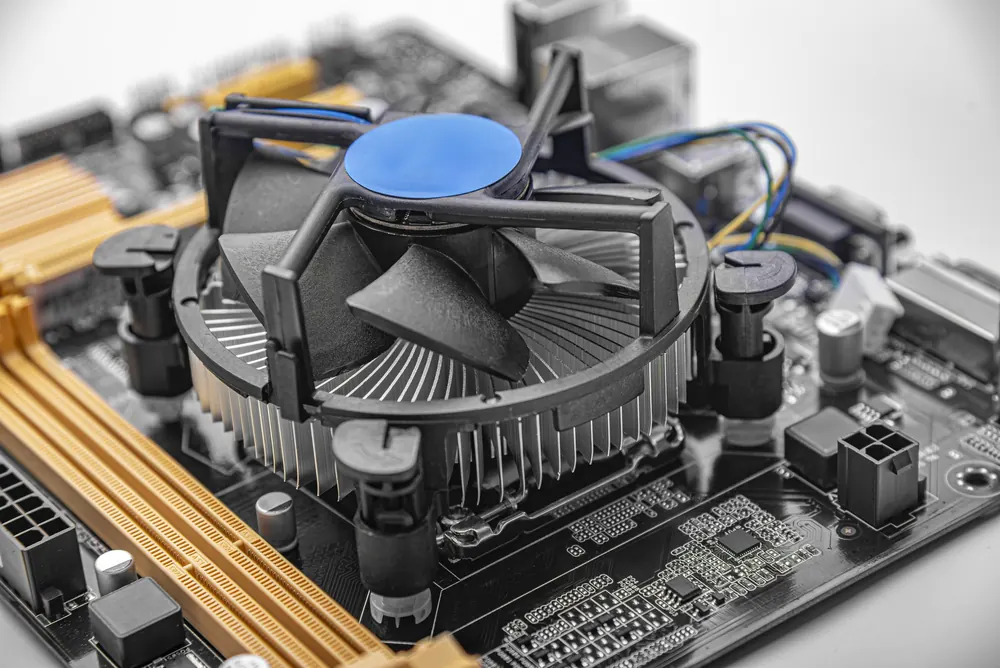
The best CPU cooler for a Linux gaming PC is the Thermalright Peerless Assassin 120 SE for most builds. It has two cooling towers, six heat pipes and a pair of 120mm PWM fans, with support for AMD AM5 and AM4 and Intel LGA1851 and LGA1700. There's no extra software to worry about. Both fans connect to standard motherboard headers.
For liquid cooling, the Arctic Liquid Freezer III Pro 240 and 360 are good choices. Their fans and pumps run through motherboard PWM headers, so Linux handles them like ordinary fans. USB-connected AIOs, such as the NZXT Kraken Elite, are different. They rely on liquidctl for control.
Specs come from the UK Amazon listings and maker pages, plus the liquidctl and CoolerControl documentation, checked on 21 November 2026. We have not tested these coolers ourselves. This guide brings published information together.
Jump to: Quick picks · Linux cooler control table · The coolers · How to choose · FAQ
We may earn a commission if you buy through links on this page. It never changes our verdicts. How we review.
Quick picks
- Best overall: Thermalright Peerless Assassin 120 SE (twin tower, 6 heat pipes, 155mm tall)
- Best budget single tower: Arctic Freezer 36 (push-pull 120mm fans, LGA1851/1700 contact frame)
- Best premium air: Noctua NH-D15 G2 (8 heat pipes, two 140mm fans)
- Best quiet air with RAM clearance: be quiet! Dark Rock 5
- Best 240mm AIO: Arctic Liquid Freezer III Pro 240 A-RGB
- Best 360mm AIO: Arctic Liquid Freezer III Pro 360 A-RGB
- Best AIO with a screen: NZXT Kraken Elite 360 RGB (liquidctl support)
Thermalright Peerless Assassin 120 SE
Check price on AmazonArctic Liquid Freezer III Pro 360 A-RGB
Check price on AmazonLinux cooler control table
On Linux, the question is not "does it cool" but "what controls the fans and pump". Anything plugged into a motherboard fan header is controlled through the board's sensor chip using a kernel hwmon driver. CoolerControl's hardware support page says many boards need the it87 or nct6687 drivers for this. USB coolers need liquidctl, which CoolerControl also uses.
| Cooler | Type | Connects by | Linux control route | Maker software | Sockets (listing) |
|---|---|---|---|---|---|
| Thermalright Peerless Assassin 120 SE | Twin-tower air, 2 x 120mm | 4-pin PWM fan headers | Motherboard hwmon, BIOS curve or CoolerControl | None needed | AM4, AM5, LGA1851, LGA1700 and older |
| Arctic Freezer 36 | Single-tower air, 2 x 120mm push-pull | 4-pin PWM fan header | Motherboard hwmon, BIOS curve or CoolerControl | None needed | AM4, AM5, LGA1851, LGA1700 |
| Noctua NH-D15 G2 | Twin-tower air, 2 x 140mm | 4-pin PWM fan headers | Motherboard hwmon, BIOS curve or CoolerControl | None needed | AM4, AM5, LGA1851, LGA1700, LGA1200, LGA115x |
| be quiet! Dark Rock 5 | Single-tower air, 1 x 120mm | 4-pin PWM fan header | Motherboard hwmon, BIOS curve or CoolerControl | None needed | AM4, AM5, LGA1851, LGA1700, LGA1200, LGA1150, LGA1151, LGA1155, LGA1156 |
| Arctic Liquid Freezer III Pro 240 and 360 | AIO, PWM pump and VRM fan | One 4-pin PWM lead (or splitter for 3 separate) | Motherboard hwmon, BIOS curve or CoolerControl; no USB | None needed | AM4, AM5, LGA1851, LGA1700 (contact frame) |
| NZXT Kraken Elite 360 RGB | AIO with an LCD | USB plus fan connections | liquidctl, "Only partially supported" (from 1.15.0): pump, fans and LCD images; light ring not yet | NZXT CAM (Windows) | AM4, AM5, LGA1851, LGA1700, LGA1200, LGA115x |
Who should pick an AIO on Linux: anyone who wants a 240mm or 360mm radiator and can mount it. The Arctic models avoid USB control entirely. Who should stay with air: anyone who wants nothing that can fail in software, or a smaller case with good height clearance.
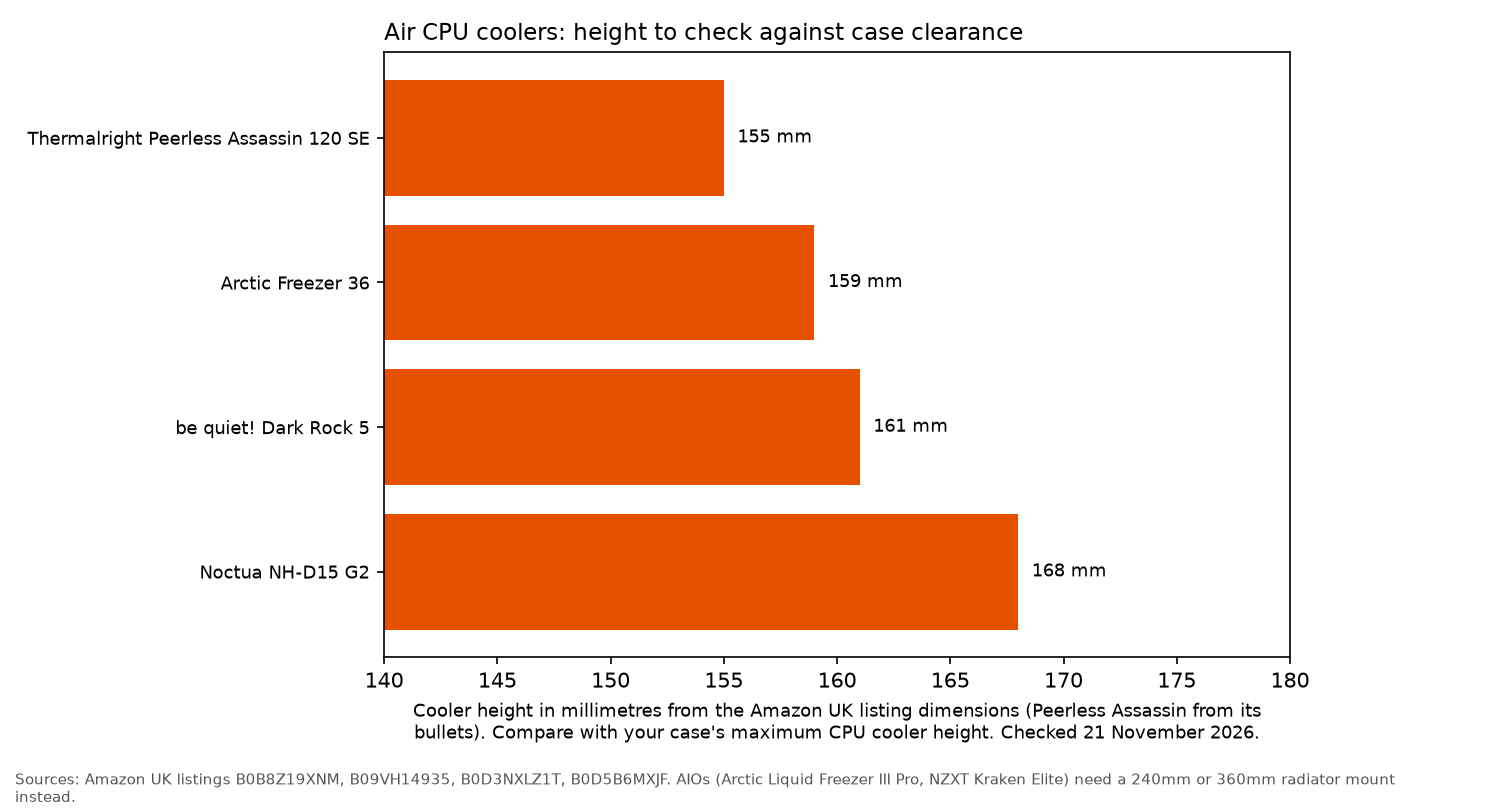
Chart caption: The bars match the image: Thermalright Peerless Assassin 120 SE 155mm, Arctic Freezer 36 159mm, be quiet! Dark Rock 5 161mm and Noctua NH-D15 G2 168mm. The Peerless Assassin bar uses the bullet's 155mm height. The product dimensions field on that listing lists the same 125, 135 and 155mm measurements with the axes labelled differently. The other three heights match each listing's product dimensions. AIOs are not on the chart: they need a 240mm or 360mm radiator mount. Checked 21 November 2026.
Thermalright Peerless Assassin 120 SE: best overall
The Peerless Assassin 120 SE pairs two aluminium towers with six 6mm copper heat pipes and two TL-C12C 120mm PWM fans. A bullet gives 1550rpm, 25.6dB(A) or less per fan and a height of 155mm. The product dimensions field lists 15.5 x 13.5 x 12.5 cm, the same three measurements with the axes labelled differently. Mounting hardware covers AMD AM4 and AM5 and Intel LGA1851, LGA1700 and older sockets. Both fans are standard 4-pin PWM, so the motherboard controls them on Linux with no extra software.
Who it's for: most gaming builds on Ryzen or Core CPUs. Who it isn't for: cases with less than 155mm of cooler clearance, or anyone who wants a screen or lighting control.
Check price on AmazonArctic Freezer 36: best budget single tower
The Arctic Freezer 36 is a single tower with four offset heat pipes and two pressure-optimised 120mm fans in push-pull. It includes a contact frame for Intel LGA1851 and LGA1700, which Arctic says improves contact pressure. The size line gives a height of 159mm and a top fan speed of 1800rpm, and the warranty field says 6 years. A single tower leaves more room around the RAM slots than a twin tower. The technical specifications on the listing give a 4-pin PWM connector. The product information field says 3-pin. Those lines disagree.
Who it's for: mid-range gaming CPUs on a budget. Who it isn't for: the hottest high-end chips, where a twin tower or 360mm AIO has more headroom.
Check price on AmazonNoctua NH-D15 G2: best premium air
Noctua's second-generation NH-D15 has eight heat pipes, 20% more surface area than the original according to the listing, and two NF-A14x25r G2 140mm PWM fans with low-noise adaptors. The listing gives 168mm of height and 24.8dB at the 1500rpm maximum. The offset design clears the top PCIe x16 slot on most current boards and gives 59mm of RAM clearance with one fan (32mm with both). Noctua points to its compatibility centre for detail. Socket support covers AM5, AM4, LGA1851, LGA1700, LGA1200 and LGA115x.
Who it's for: high-end gaming CPUs in a roomy case, quietly. Who it isn't for: cases under 168mm or builds with tall RAM.
Check price on Amazonbe quiet! Dark Rock 5: best quiet air with RAM clearance
The Dark Rock 5 is a single tower with six copper heat pipes and a Silent Wings 4 120mm PWM fan on a fluid-dynamic bearing. be quiet! says its asymmetrical design and cut-outs give "limitless memory height", and you can add a second fan on the exhaust side. The product dimensions give a height of 161mm. The compatible devices field names AMD AM5 and AM4 and Intel LGA1851, LGA1700, LGA1200, LGA1151, LGA1150, LGA1155 and LGA1156.
Who it's for: quiet builds with tall RGB RAM. Who it isn't for: anyone who wants two fans out of the box.
Check price on AmazonArctic Liquid Freezer III Pro 240 and 360: best AIOs for Linux
The Liquid Freezer III Pro uses a 38mm thick radiator, a PWM pump and a PWM-controlled VRM fan on the pump head that cools the motherboard's voltage converters. One lead goes to the motherboard. A splitter lets you control pump, VRM fan and radiator fans separately. There is no USB connection, which is the Linux advantage: your board's fan control handles everything. Both include an LGA1851 and LGA1700 contact frame and support AM5 and AM4, and the listings give a 6-year warranty.
Who it's for: high-end gaming CPUs and anyone who wants AIO cooling with no Linux software worries. Pick the 360 if your case takes it. Who it isn't for: small cases without a 240mm or 360mm radiator mount.
Check price on Amazon Check price on AmazonNZXT Kraken Elite 360 RGB: best AIO with a screen
The Kraken Elite 360 RGB has NZXT's Turbine pump, pre-applied thermal paste, a single breakout cable and an RGB Core fan frame. A bullet gives a 2.72-inch 640 x 640 IPS LCD. The item highlight on the same listing says a 2.36-inch LCD. Those lines disagree. The listing gives a 6-year warranty. NZXT's own CAM software is for Windows. On Linux, liquidctl lists the "NZXT Kraken 2024 Elite RGB" from version 1.15.0 with a "p" flag, which the project defines as "Only partially supported". Its Kraken guide says the 2024 model can still use GIF and static screen modes as of the 1.2.1 firmware, but "Controlling the light ring is not yet supported".
Who it's for: builders who want a showpiece and are comfortable with liquidctl. Who it isn't for: anyone who wants every feature working on Linux on day one.
Check price on AmazonHow to choose a CPU cooler for Linux
- Check case clearance. Air coolers here run from 155mm to 168mm tall. AIOs need a 240mm or 360mm radiator mount.
- Check the socket. All picks list AM5 and LGA1851 and LGA1700. The Arctic Liquid Freezer III Pro and the Freezer 36 include a contact frame for Intel.
- Prefer motherboard control. Coolers on PWM headers need nothing extra on Linux. Load your board's sensor driver (CoolerControl names it87 and nct6687) to set curves from the desktop.
- USB AIOs need liquidctl. Check the liquidctl device list for your exact model before you buy.
Choosing the rest of the build? See the best CPU for Linux gaming, the best PSU for a Linux gaming PC and the best RAM for a Linux gaming PC.
FAQ
Do CPU coolers need drivers on Linux?
Not if the fans and pump plug into motherboard headers. Those are controlled by the kernel's hwmon sensor drivers, the BIOS or a tool such as CoolerControl. Only USB-connected AIOs need liquidctl.
Does liquidctl support NZXT Kraken coolers?
Yes, many. Its supported devices table lists Kraken X, Z, 2023 and 2024 models. The 2023 and 2024 models are marked "Only partially supported". Check your exact model.
Can CoolerControl control my fans?
If your board's sensor chip has a working Linux driver, yes. CoolerControl says it does not ship device drivers itself and points to the it87 and nct6687 drivers for many boards.
More from OpenFrag: Gear · How we review