Best RAM for a Linux Gaming PC
The best RAM for a Linux gaming PC: 32GB DDR5-6000 picks for AM5 and Intel, DDR4 for AM4 and older boards, a 64GB kit, and how EXPO and XMP work on Linux.
Published . Updated . 8 min read.
The best RAM for a Linux gaming PC in 2026 is a 32GB (2 x 16GB) DDR5-6000 kit. For value on AM5 or Intel, the Crucial Pro DDR5-6000 CL36 is a good choice. For lower latency, look at a CL30 kit such as the G.Skill Flare X5 (AMD EXPO) or Corsair Vengeance (Intel XMP). If you have an AM4 system or a DDR4 Intel board, a 32GB DDR4-3200 CL16 kit makes more sense. Enable EXPO or XMP in the BIOS, and there's nothing extra to configure in Linux.
Specifications below are taken from the UK Amazon listings and from pages published by AMD and Intel, checked on 18 November 2026. Performance claims come from LTT Labs and TechPowerUp, with both credited by name. We have not tested these kits ourselves. This guide brings published information together.
Jump to: Quick picks · Platform table · How much you need · Speed vs FPS · EXPO and XMP on Linux · FAQ
We may earn a commission if you buy through links on this page. It never changes our verdicts. How we review.
Quick picks
- Best value DDR5: Crucial Pro 32GB (2 x 16GB) DDR5-6000 CL36, with both AMD EXPO and Intel XMP 3.0 profiles
- Fast DDR5 for AM5: G.Skill Flare X5 32GB DDR5-6000 CL30, AMD EXPO
- Fast DDR5 for Intel: Corsair Vengeance 32GB DDR5-6000 CL30, Intel XMP 3.0
- 64GB for gaming plus work: Crucial Pro 64GB (2 x 32GB) DDR5-6000 CL40
- DDR4 budget and low profile: Kingston FURY Beast 32GB DDR4-3200 CL16 (the listing calls the heat spreader low-profile)
Crucial Pro 32GB DDR5-6000 CL36
Check price on AmazonG.Skill Flare X5 32GB DDR5-6000 CL30
Check price on AmazonRAM decision table by platform
| Platform | Memory type | Official top speed (CPU maker) | Kit to buy | Capacity | Profile to enable |
|---|---|---|---|---|---|
| AM4 (Ryzen 5000) | DDR4 only | DDR4-3200 with two modules, including 2x1R (AMD, Ryzen 7 5800X3D) | DDR4-3200 CL16 | 32GB (2 x 16GB) | XMP (DOCP or A-XMP on some boards) |
| AM5 (Ryzen 7000 and 9000) | DDR5 only | DDR5-5600 with 2 modules, DDR5-3600 with 4 (AMD, Ryzen 5 9600) | DDR5-6000 CL30 to CL36, EXPO | 32GB, or 64GB for work | EXPO |
| LGA1700 (Intel 12th to 14th gen) | DDR4 or DDR5, set by the motherboard | Up to DDR5-5600 or DDR4-3200 on many 13th and 14th gen desktop parts. 12th gen is up to DDR5-4800 or DDR4-3200. Some 13th and 14th gen i3 and i5 parts are listed at DDR5-4800 (Intel) | DDR5-6000 XMP, or DDR4-3200 CL16 on a DDR4 board | 32GB | XMP |
| LGA1851 (Core Ultra 200S) | DDR5 only | Up to DDR5-6400 (Intel) | DDR5-6000 or 6400 XMP | 32GB | XMP |
Official speeds are what the CPU maker guarantees. Running an EXPO or XMP kit faster than those speeds counts as a memory overclock. AMD lists EXPO support in its specifications. TechPowerUp's Zen 5 deep dive calls DDR5-6000 the sweetspot overclocking speed on Ryzen 7000, the highest stable speed with the fabric clock and the memory clock at 1:1, and says Ryzen 9000 still steps to a 1:2 divider above DDR5-6000. Actual results depend on the motherboard and CPU. For the best speed on AM5, choose two sticks rather than four and check the motherboard's QVL. On the Ryzen 7 5800X3D page, four single-rank modules are listed at DDR4-2933, slower than two modules at DDR4-3200.
16GB vs 32GB for gaming
For a new gaming PC, 32GB is the safer choice. Steam's October 2026 Hardware and Software Survey covers all platforms, not only Linux. On that survey, 16GB is the most common amount at 41.42%, up 3.60 points that month. 32GB is next at 37.06%, down 5.16 points. The same table puts 8GB at 7.52%, 64GB at 3.94%, 12GB at 2.45% and 24GB at 2.31%. Every other size is under 1.5%. LTT Labs reported in February 2026 that AI demand had driven DRAM prices sharply higher, which is why a 16GB kit can look tempting.
On Linux, 32GB gives the game, Steam, a browser, Discord and shader compilation some breathing room. Proton runs Windows games through a compatibility layer, and we found no reliable published measurement of how much extra memory it uses. The sensible approach is to plan RAM capacity as you would for Windows.
64GB only makes sense if the PC also handles virtual machines, local AI models or large creative projects. For AI running on the CPU, LTT Labs says capacity "remains far more important than memory frequency".
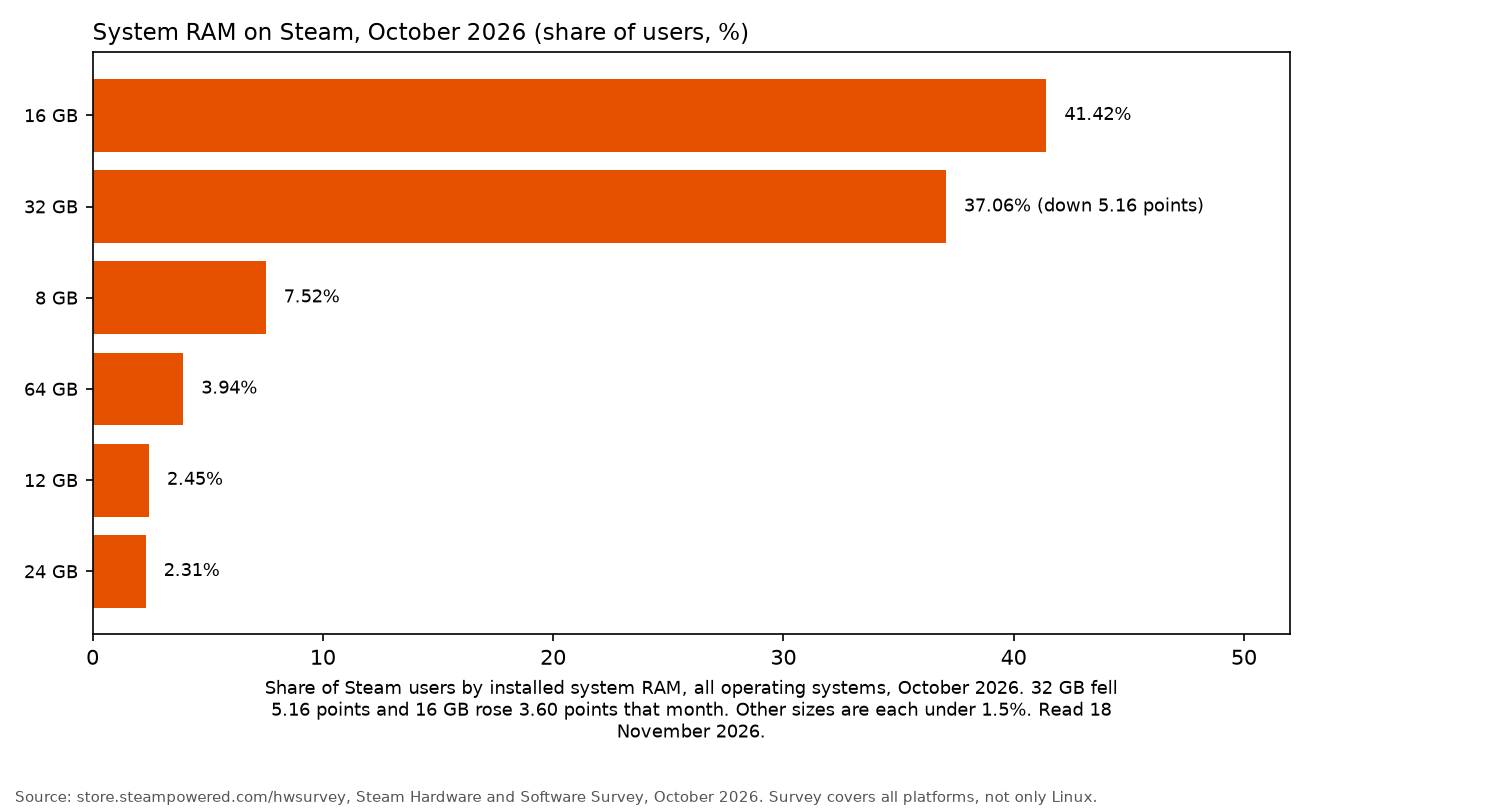
Chart caption: The bars match the paragraph above. They are the October 2026 Steam Hardware and Software Survey shares for all platforms: 16GB 41.42% (up 3.60 points), 32GB 37.06% (down 5.16 points), 8GB 7.52%, 64GB 3.94%, 12GB 2.45% and 24GB 2.31%. Other sizes on that survey are each under 1.5%. Not an OpenFrag measurement. Checked 18 November 2026.
DDR5 speed vs FPS
The biggest performance gains come from moving beyond the slow default JEDEC speed, according to LTT Labs' 2026 memory tests. Once memory reaches roughly 6000 to 6800 MT/s, the tests found "diminishing returns quickly".
At 4K, the graphics card becomes the limiting factor, so faster memory makes little difference. LTT Labs found the Ryzen 7 9800X3D the least affected by memory speed, thanks to its large cache. TechPowerUp reported AMD's own testing claim that going from DDR5-6000 to DDR5-4800 drops FPS by less than 1% on the Ryzen 7 9850X3D. That figure is AMD's, as reported by TechPowerUp, not an OpenFrag measurement.
As for DDR5 vs DDR4 for gaming, the deciding factor is your platform rather than FPS. AM5 and LGA1851 require DDR5, while AM4 supports DDR4 only. With LGA1700, the motherboard determines which type you need.
Crucial Pro DDR5-6000 CL36: best value
The Crucial Pro listing (CP2K16G60C36U5B) specifies 32GB across two 16GB sticks, running at 6000MHz CL36 and 1.35 V. It includes both XMP 3.0 and EXPO profiles, and says it is compatible with Intel Core 12th gen desktop CPUs and above, and with AMD Ryzen 7000 series desktop CPUs and above.
Having one kit that covers both platforms makes this the simplest recommendation for most DDR5 builds.
Who it's for: most AM5 and Intel DDR5 builds.
Who it isn't for: anyone chasing the lowest latency.
Check price on AmazonG.Skill Flare X5 and Corsair Vengeance CL30: fast DDR5
For AM5, the G.Skill Flare X5 (F5-6000J3038F16GX2-FX5) offers DDR5-6000 with CL30-38-38-96 timings at 1.35 V. Its listing includes both a JEDEC profile and an AMD EXPO profile, names X870, X670, B850, B840, B650 and A620 boards, and gives the kit a 33mm height. The same listing says not to mix memory kits, because mixing them leads to stability issues or system failures.
For Intel, the Corsair Vengeance CMK32GX5M2B6000C30 is the corresponding choice. The listing offers Intel XMP 3.0 profiles at 6000MHz CL30, and says the kit is optimised for Intel motherboards. Enabling that profile is a BIOS setting. The same listing names Corsair's iCUE software for saving custom XMP profiles.
G.Skill Flare X5 32GB DDR5-6000 CL30
Check price on AmazonCorsair Vengeance 32GB DDR5-6000 CL30
Check price on AmazonCrucial Pro 64GB DDR5-6000 CL40: for gaming plus work
This kit, CP2K32G60C40U5B, provides 64GB through two 32GB sticks. The title and the model number say 6000MHz CL40, with XMP 3.0 and EXPO support, at 1.35 V. One bullet on the same listing says CL36. Those lines disagree. Check the product page before buying. Using two sticks instead of four also avoids the 4-module speed reduction AMD specifies for AM5.
Check price on AmazonDDR4 picks for AM4 and older Intel
- Kingston FURY Beast 32GB DDR4-3200 CL16 (KF432C16BB1K2/32): The listing specifies a low-profile heat spreader, Intel XMP and "Ready for AMD Ryzen". Its low height makes it a good fit beneath large air coolers. The product details list 1.35 V and CL16.
- Corsair Vengeance LPX 32GB DDR4-3200 C16 (CMK32GX4M2B3200C16): The title and the manufacturer part number say CMK32GX4M2B3200C16, rated DDR4-3200 C16 with XMP 2.0. The product details list 1.35 V. The listing's details show the model name CM32GX4M22E3200C16. Those names disagree. Check the product page before buying.
Kingston FURY Beast 32GB DDR4-3200 CL16
Check price on AmazonCorsair Vengeance LPX 32GB DDR4-3200 C16
The title and the manufacturer part number say CMK32GX4M2B3200C16. The listing's details show the model name CM32GX4M22E3200C16. Those names disagree. Check the product page before buying.
Check price on AmazonEXPO and XMP on Linux
EXPO and XMP work on Linux just as they do on Windows because the motherboard firmware handles them, not the operating system.
Select the appropriate profile in the BIOS and save the settings. The motherboard will train the memory during the next boot. Once Linux starts, open a terminal and check the configuration:
sudo dmidecode -t memory | grep -i "speed"
free -h
dmidecode reports each stick's rated and configured speed, while free -h confirms the total memory available.
If the PC won't boot after enabling a profile, clear CMOS or allow the motherboard to fall back to its previous settings. It's also worth updating the BIOS before enabling EXPO. Ars Technica's Ryzen 9000 review found that early Ryzen 9000 test systems applied incorrect EXPO settings and required manual adjustments.
Compatibility checklist
- DDR4 and DDR5 aren't interchangeable, so check which type your motherboard supports.
- Buy a single matched kit. The G.Skill listing specifically warns against mixing kits.
- Install two sticks in the slots specified by your motherboard manual, usually A2 and B2.
- Check the motherboard's QVL or AMD's memory compatibility list for your kit.
- Check CPU cooler clearance, particularly with large air coolers. Low-profile memory can help.
Planning the rest of the build? Take a look at the best GPU for Linux gaming, best SSD for Linux gaming, Linux gaming guide and best Linux gaming laptop.
FAQ
Is 16GB of RAM enough for gaming on Linux?
Yes, for many games. It is also still the most common RAM capacity among Steam users, at 41.42% in the October 2026 survey, which covers all platforms. For a new build, 32GB offers more room for newer games and background applications.
Is DDR5-6000 worth it over DDR5-5600?
TechPowerUp calls DDR5-6000 the sweetspot overclocking speed on Ryzen 7000, and LTT Labs found that AMD systems often reached their best results around that speed. The difference in games is small. If the gap is large, the less expensive kit is the sensible buy.
Do I need EXPO for AMD or XMP for Intel?
Without an enabled profile, RAM runs at the slower default JEDEC speed. Many kits support both EXPO and XMP, so check the listing to make sure it includes the profile your platform needs.
Does Linux support XMP and EXPO?
Yes. The motherboard firmware applies the profile before Linux boots, so the operating system makes no difference.
Can I mix two RAM kits?
It is best to avoid mixing kits. The G.Skill listing says kits are sold as matched sets, and that mixing them leads to stability issues or system failures.
More from OpenFrag: Gear · How we review