Best Capture Card for Linux
The best capture card for Linux: Magewell, Cam Link 4K and Elgato 4K X for OBS, with Linux support labelled vendor-listed or community-reported.
Published . Updated . 10 min read.

The best capture card for Linux is one that supports UVC, the USB video standard the kernel's uvcvideo driver handles without extra software. The Magewell USB Capture HDMI Gen 2 is the safest choice because Magewell lists Linux support. For a camera in OBS, the Elgato Cam Link 4K is a lower-cost option that ComputingForGeeks reports works through uvcvideo after mainline kernel fixes. For 4K60 console capture, the Elgato 4K X needs a kernel with a recent USB quirk, which the patch author describes.
This guide is based on Magewell's USB Capture support page, ComputingForGeeks' Linux capture card guide, a kernel developer's write-up of the Elgato 4K X fix, the OBS Studio knowledge base and Amazon UK listings. Each Linux compatibility claim is marked vendor-listed or community-reported. We have not tested these cards ourselves.
Quick picks
- Best for Linux overall: Magewell USB Capture HDMI Gen 2 (vendor-listed Linux support)
- Best for a camera in OBS: Elgato Cam Link 4K (community-reported, kernel fixes upstream)
- Best for 4K60 consoles: Elgato 4K X (community-reported, kernel patch in Linux 6.19 and stable trees)
- Best budget 1080p60: UGREEN Video Capture Card 1080P 60fps (the listing description says plug and play on Linux; UVC is not stated)
- Console capture with caveats: Elgato HD60 X (the listing says driverless on Windows and Mac, and does not name Linux) and AVerMedia GC553 (Windows and macOS on the listing; Linux reports are community-reported and mixed)
We may earn a commission if you buy through links on this page. It never changes our verdicts. How we review.
Magewell USB Capture HDMI Gen 2
Check price on AmazonElgato Cam Link 4K
Check price on AmazonLinux compatibility table
The Linux evidence column is the one to read before buying. Vendor-listed means the manufacturer states Linux support. Community-reported means a named write-up describes the card working with the kernel's driver, and the manufacturer does not guarantee it.
| Card | Interface | Best capture mode | Passthrough | UVC | Linux evidence | Source |
|---|---|---|---|---|---|---|
| Magewell USB Capture HDMI Gen 2 | USB 3.0 on the listing | 1080p at up to 75 fps, from ComputingForGeeks citing Magewell's spec page. The Amazon listing does not state 75 fps. | No, according to ComputingForGeeks | Yes. The listing says no driver is needed. | Vendor-listed: Magewell's support page lists Linux from kernel 2.6.35 on x86, x64 and ARM. ComputingForGeeks also reports V4L2 and ALSA. | Magewell, ComputingForGeeks, Amazon UK listing |
| Elgato Cam Link 4K | USB 3.0 | 1080p60 and 4K30. The listing says 4K60 is MJPG only, and only on the latest model. | No, according to ComputingForGeeks | Yes, community-reported through mainline uvcvideo fixes | Community-reported. The listing names Windows, macOS and iPadOS, not Linux. | ComputingForGeeks, Amazon UK listing |
| Elgato 4K X | USB 3.2 Gen 2 (10Gbps) on the listing | 4K at up to 144 fps, 1080p at up to 240 fps, on the listing | HDMI 2.1, VRR, on the listing | Yes. The kernel patch author describes it as a UVC device. | Community-reported: 4K60 on Linux 6.19, backported to 6.1, 6.6, 6.12 and 6.18 | Kernel patch author, Amazon UK listing |
| Elgato HD60 X | USB 3.0 | 4K30 or 1080p60 HDR10 capture, from the listing title | The listing bullet includes 4K60 HDR10 and higher rates, including 1080p240 | Not stated. The listing says driverless on Windows and Mac. | Not vendor-listed. ComputingForGeeks says Elgato names no Linux support. | Amazon UK listing, ComputingForGeeks |
| AVerMedia GC553 | USB 3.1 Type C, in the listing's hardware interface field | The title and resolution field say 4K30 and 1080p120. One bullet also says 4Kp60 HDR capture. | 4K60 HDR in the title. The description also says up to 240 Hz at full HD. | Not stated as a device feature. The Windows requirements include the phrase "Support UVC Protocol". | Not vendor-listed. The listing names Windows and macOS. A review on the listing reports no picture on Linux, so community reports are mixed. | Amazon UK listing |
| UGREEN 1080P 60fps | USB 3.0 at 5Gbps, on the listing | 1080p60, YUV2 and MJPG, on the listing | 4K60 (4:2:0) and 4K30 (4:4:4), on the listing | Not stated | The product description says plug and play on Linux. The specification table names Windows. That is a listing description, not a support-page statement, and it is not labelled here as community-reported. | Amazon UK listing |
What matters
- UVC first. ComputingForGeeks says a UVC capture card shows up as a video device and works in OBS without a separate driver. It also says PCIe cards often depend on out-of-tree drivers you have to build yourself.
- USB bandwidth. ComputingForGeeks says uncompressed 1080p60 needs a USB 3 port. The Elgato 4K X listing asks for USB 3.2 Gen 2, and says USB 3.2 Gen 1 works with a reduced capture resolution. The kernel patch author reports that a 5Gbps link caps that card at 4K30, and that 4K60 needs the 10Gbps connection.
- Uncompressed or MJPEG. ComputingForGeeks says YUY2 or NV12 means the CPU encodes the video once. MJPEG uses less USB bandwidth, which helps cheaper cards, and the CPU then has to decode it.
- Passthrough. This sends the HDMI signal to a monitor or TV while the card captures it. ComputingForGeeks says neither the Magewell Gen 2 nor the Cam Link has passthrough.
- HDCP. UGREEN's listing says HDCP content is not supported, and that HDCP should be turned off on a console first. ComputingForGeeks says a black picture from a console is often HDCP, and that the Cam Link accepts unencrypted HDMI only.
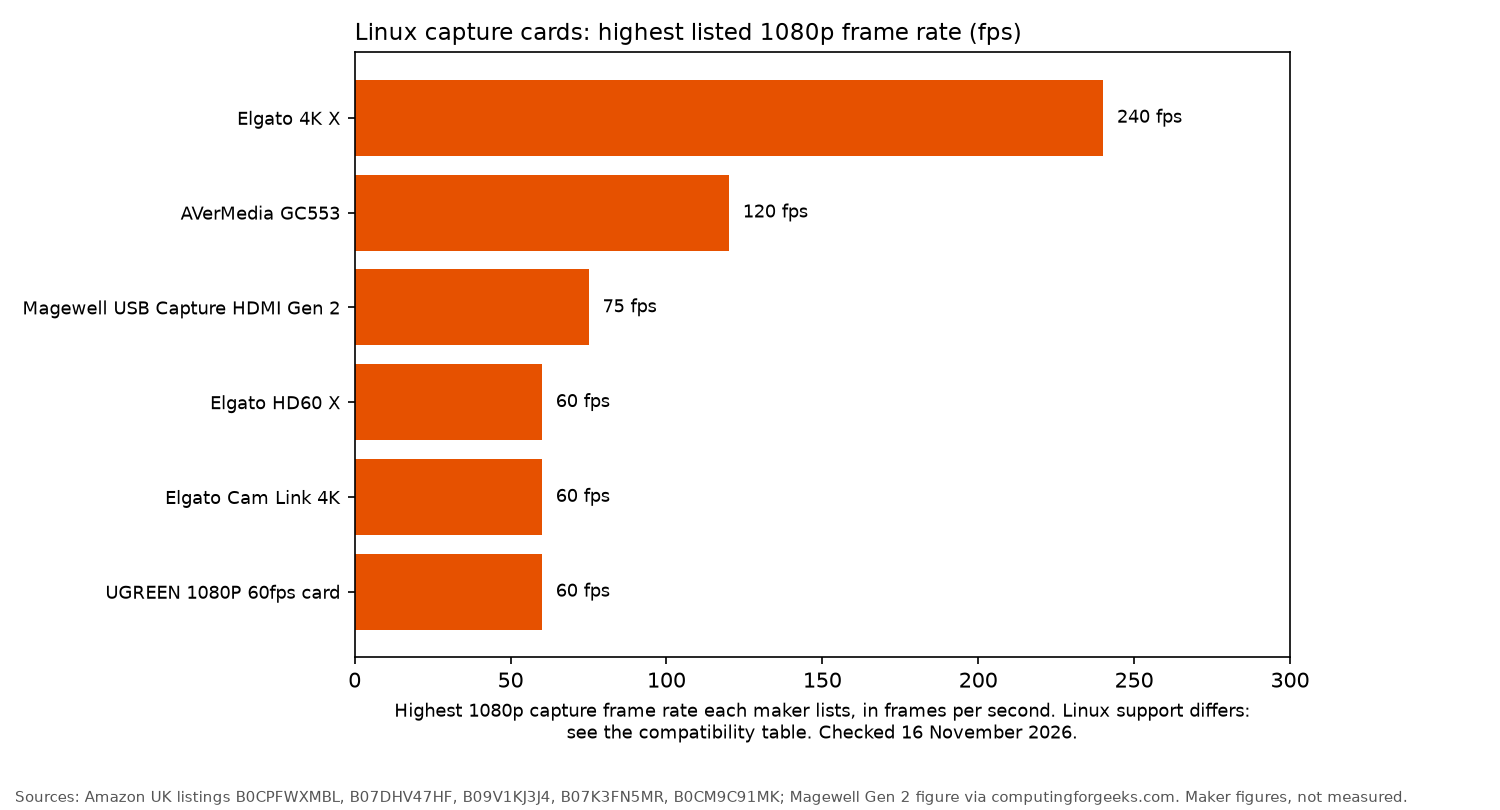
The picks
Magewell USB Capture HDMI Gen 2
The Amazon listing says the Magewell works with Windows, Mac and Linux without a driver, over USB 3.0. Magewell's USB Capture support page lists Linux for the USB Capture family from kernel 2.6.35 onwards, on x86, x64 and ARM. ComputingForGeeks reports uncompressed 1080p at up to 75 fps, with YUY2 among the formats, no passthrough, and Ubuntu builds of Magewell's tools. It attributes that frame rate to Magewell's spec page. The Amazon listing does not state 75 fps. Its bullets cap input and capture at 2048 by 2160, while a resolution field also lists 4K and 5K, so this guide uses the 1080p figure from ComputingForGeeks and does not treat the Gen 2 as a 4K card.
The drawbacks are the higher upfront cost and the lack of HDMI passthrough. ComputingForGeeks makes the same point about passthrough, and about paying more than a generic dongle for the support and the uncompressed formats.
Who it's for: lecture capture, an always-on OBS scene, or a machine console, which is how ComputingForGeeks frames this card. Who it isn't for: 4K capture, or a monitor on the same HDMI signal.
Check price on AmazonElgato Cam Link 4K
The listing presents the Cam Link 4K as a way to use a camera's HDMI output as a webcam feed. It lists 1080p60 and 4K30, and says 4K60 is MJPG only on the latest model, the one marked 20GAM9903. The input line says unencrypted HDMI. System requirements name Windows 10, macOS 13 and iPadOS 17, not Linux.
ComputingForGeeks reports that mainline uvcvideo includes a fix for a malformed format response and a second fix for stalls after the HDMI resolution changes. With those fixes, it says current distribution kernels offer 4K30 and 1080p60. It also says there is no passthrough, so a console with HDCP on produces a black frame.
Who it's for: a mirrorless camera or camcorder in OBS or on a video call. Who it isn't for: console capture, or a monitor connected to the same HDMI signal.
This is a third-party offer. Check the seller and returns at checkout.
Check price on AmazonElgato 4K X
The listing specifies capture at up to 4K at 144 fps or 1080p at 240 fps, plus HDMI 2.1 and VRR passthrough. It names Windows and macOS, not Linux. It asks for a USB 3.2 Gen 2 port, and says USB 3.2 Gen 1 works with a reduced capture resolution.
The kernel patch author describes the 4K X as a UVC device that used to drop from a 10Gbps link to 5Gbps, and then offer only up to 4K30. The same write-up says a kernel quirk keeps the 10Gbps link, with clean 4K60 in OBS on Linux 6.19. The fix was backported to the 6.1, 6.6, 6.12 and 6.18 stable branches. Elgato has not published that Linux fix. The write-up says the card is sold for Windows and macOS.
Who it's for: PS5, Xbox and PC players who want 4K60 capture on a kernel that includes the quirk, and who have a 10Gbps USB port. Who it isn't for: an older kernel without that quirk, or a computer without a 10Gbps USB port.
Check price on AmazonUGREEN Video Capture Card 1080P 60fps
The listing says the UGREEN records 1080p60 in YUV2 and MJPG, over USB 3.0 at 5Gbps. It also says 4K60 (4:2:0) and 4K30 (4:4:4) passthrough, plus 3.5mm audio input and output, and that setup is plug and play and driver-free. The product description says it plugs and plays on Windows, Linux and Android. The specification table names Windows only. The listing does not say UVC. This guide does not call that Linux line vendor-listed support, and it does not call it a community report.
Who it's for: a first capture card for a Switch, PlayStation, Xbox or camera, which the listing names. Who it isn't for: 4K recording, or a manufacturer support page that names Linux. The listing's capture limit is 1080p60.
Check price on AmazonElgato HD60 X and AVerMedia GC553
The HD60 X listing title says 1080p60 HDR10 or 4K30 capture, over USB 3.0, with driverless plug and play on Windows and Mac. A bullet on the same listing lists passthrough at 4K60 HDR10 and at higher rates, including 1080p240. The chart uses the capture figure, 60 fps at 1080p, not the passthrough rates. The listing does not say UVC and does not name Linux. ComputingForGeeks says Elgato lists the HD60 X as discontinued and names no Linux support.
The GC553 listing's hardware interface field says USB 3.1 Type C. The title and the resolution field say 4K30 capture and 1080p at up to 120 fps, with 4K60 HDR pass-through. One bullet also says 4Kp60 HDR capture, which does not match the title, so this guide uses the title and the resolution field for the 4K rate, and the 120 fps full HD figure for the chart. The Windows system requirements include the phrase "Support UVC Protocol". That is not a statement that the card is a UVC device on Linux. The listing names Windows and macOS, not Linux. A review on that listing says the card was detected on Linux and produced no picture, so treat Linux use as community-reported and mixed, not vendor-listed.
Sometimes sold via Amazon Global Store; check import charges at checkout.
Check price on AmazonBoth are easier to justify if you also capture from Windows. For a Linux-focused setup, the Elgato 4K X is the option with a named kernel fix.
Setup on Linux
These steps follow ComputingForGeeks. OBS's own knowledge base covers the app. The checks below are how you see what the card actually offers. They are not a test result from OpenFrag.
- Connect the capture card to a USB 3 port. Run
ls /dev/video*to see whether a device node appears. - Install the v4l-utils package. Use
v4l2-ctl --list-devices, thenv4l2-ctl -d /dev/video0 --list-formats-exton the node the card created. ComputingForGeeks notes that a webcam may already own/dev/video0, so pass-dfor the capture card's node. - In OBS, add a Video Capture Device (V4L2) source, select the card, then choose the format and resolution. ComputingForGeeks prefers YUYV or NV12 when the card offers it, and MJPEG only when it does not.
- For HDMI sound, add an Audio Input Capture source. ComputingForGeeks says V4L2 carries video only, so audio is a separate PulseAudio or PipeWire input.
- If a console produces a black picture, turn HDCP off in the console's settings. ComputingForGeeks and UGREEN's listing both describe that check.
New to Linux gaming? Start with the Linux gaming guide. For camera options, see the webcam for Linux guide. Other useful reads include Linux gaming laptops, Steam Deck accessories and gaming mice for Linux.
FAQ
Do capture cards work on Linux?
ComputingForGeeks says most USB capture cards that follow UVC work through the kernel's uvcvideo driver, and that PCIe models often need a separate driver. Not every card in this guide states UVC on its listing.
Does Elgato work on Linux?
Elgato does not list Linux support for the cards here. ComputingForGeeks reports that the Cam Link 4K works on current kernels after upstream uvcvideo fixes. The kernel patch author reports 4K60 from the Elgato 4K X on Linux 6.19 and on the 6.1, 6.6, 6.12 and 6.18 stable branches. The HD60 X listing names Windows and Mac.
Which capture cards are UVC?
ComputingForGeeks and the kernel patch author describe the Magewell Gen 2, the Cam Link 4K and the Elgato 4K X as UVC devices. The HD60 X listing says driverless on Windows and Mac and does not say UVC. The GC553 listing mentions "Support UVC Protocol" only in the Windows system requirements. The UGREEN listing does not say UVC.
Can I capture a console with OBS on Linux?
Yes, when the card works as a V4L2 device. Turn HDCP off on the console, connect it through the capture card and add a V4L2 video source in OBS. ComputingForGeeks and UGREEN's listing both flag HDCP as the usual cause of a black picture.
Do I need USB 3?
Yes for the modes in this guide. ComputingForGeeks says uncompressed 1080p60 needs USB 3. The Elgato 4K X listing asks for USB 3.2 Gen 2 for full capture, and the kernel patch author says a 5Gbps link caps that card at 4K30.
More from OpenFrag: Gear · How we review