Best Webcam for Linux, for Streaming and Calls
The best webcam for Linux in the UK: UVC cameras for OBS and calls, with a table of which controls work through V4L2 and what needs the Windows or macOS app.
Published . Updated . 7 min read.
The best webcam for Linux is a UVC camera like the Logitech C920S. The kernel's uvcvideo driver recognises it, OBS picks it up as a V4L2 device and there's nothing to install. For sharper video, there's the Logitech Brio 4K. For streaming, the Elgato Facecam MK.2 is worth a look. The main limitation is software. The Windows and macOS apps that provide extra settings don't run on Linux, so it's important to know which controls work without them.
This roundup is based on Ceedo's Linux webcam list, Linuxano's budget webcam guide and Amazon UK listings. Ceedo says its team tested every camera on its list, while Linuxano provides a buyer's guide. All descriptions of image quality are attributed to those sources rather than presented as our own findings. We have not tested these cameras ourselves.
Quick picks
- Best overall: Logitech C920S HD Pro
- Best budget: Logitech C270
- Best premium 4K: Logitech Brio 4K
- Best mid-range 2K: Anker PowerConf C200
- Best for streaming and content: Elgato Facecam MK.2
We may earn a commission if you buy through links on this page. It never changes our verdicts. How we review.
Logitech C920S HD Pro
Check price on AmazonElgato Facecam MK.2
Check price on AmazonLinux control table
UVC (USB Video Class) is the standard that allows Linux to recognise a webcam without a separate vendor driver. According to Linuxano, the uvcvideo driver has been part of the kernel since version 2.6.26.
The table below compares the controls each source reports as available through V4L2 with those that still depend on the manufacturer's software.
| Camera | Best mode on the Amazon UK listing | Controls on Linux, as the source reports | Needs the vendor app | Checked against |
|---|---|---|---|---|
| Logitech C920S | 1080p at 30fps | Plug and play; basic controls through v4l2-ctl or guvcview (Linuxano) | Logitech Capture is Windows and Mac only (Linuxano) | Linuxano, Amazon UK listing |
| Logitech C270 | 720p at 30fps | Recognised by uvcvideo; fixed focus (Linuxano) | No vendor app needed for basic use | Linuxano, Amazon UK listing |
| Logitech Brio 4K | 4K at 30fps | Ceedo says exposure, gain, sharpening and the three field-of-view presets work through V4L2 | The listing names Logi Options+ for manual focus, colour presets and firmware updates | Ceedo, Amazon UK listing |
| Anker PowerConf C200 | 2K | Ceedo says full UVC with no configuration | The listing names AnkerWork for field-of-view presets and lists Windows and macOS only | Ceedo, Amazon UK listing |
| Elgato Facecam MK.2 | 1080p at 60fps uncompressed (USB 3.0), per the listing | Ceedo says manual exposure, white balance and other settings map to V4L2 controls | Camera Hub is Windows and macOS only (Ceedo); the listing lists Windows and macOS | Ceedo, Amazon UK listing |
The Facecam MK.2 listing specifies 1080p30 for HDR and up to 1080p60 for uncompressed video. Check which mode your USB port supports.
What matters for a Linux webcam
- UVC compliance. Linuxano recommends choosing a UVC-compliant webcam and avoiding models that depend on vendor software.
- Resolution and frame rate. Ceedo points out that 30fps can be limiting for fast movement and recommends 60fps for streaming.
- Controls without the app. Linuxano warns that some webcams offer fewer settings through UVC than through their proprietary software.
- Lighting. Check your lighting before paying extra for a higher resolution.
The picks
Logitech C920S HD Pro: best overall
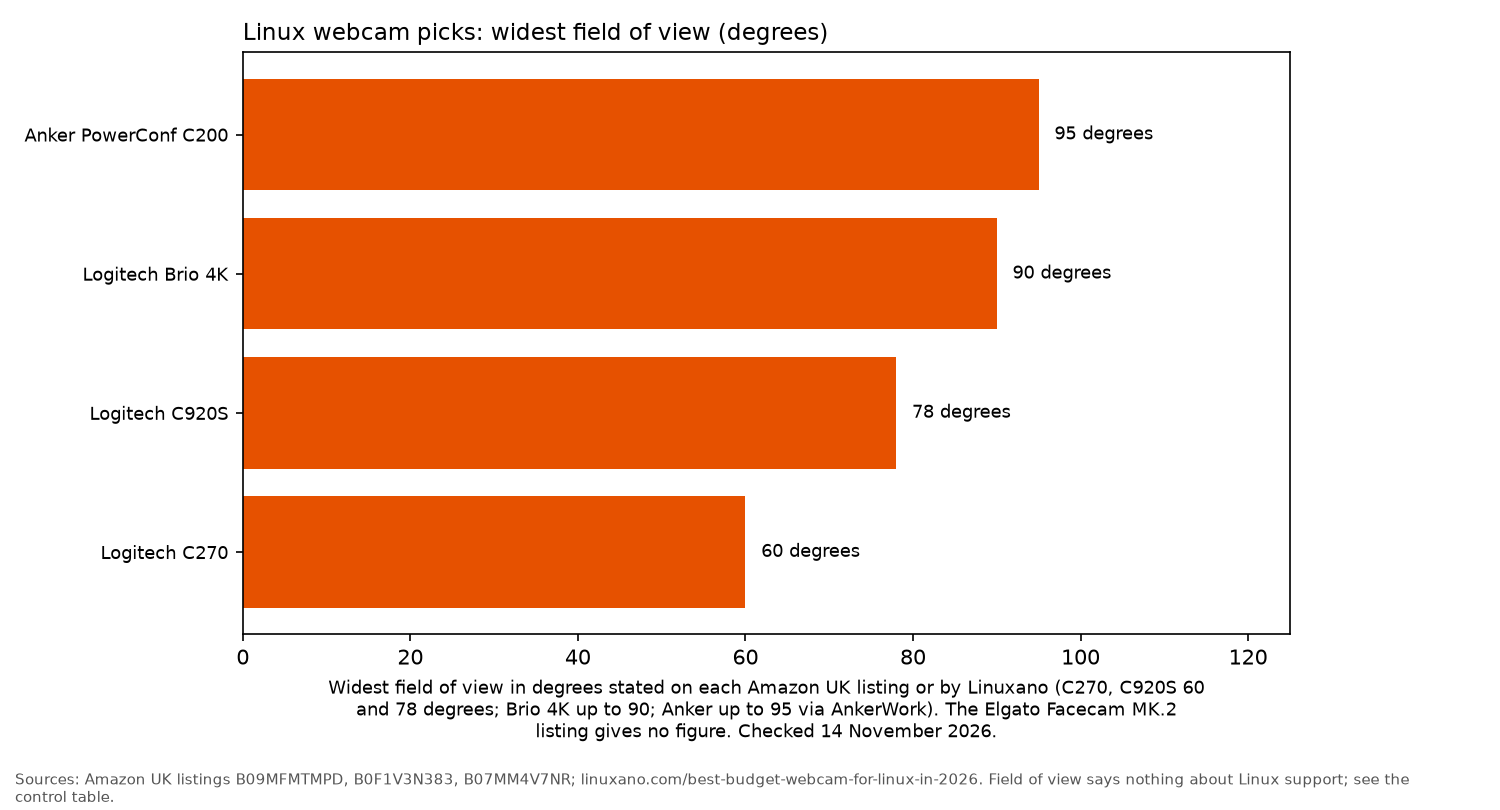
The Logitech C920S listing specifies full HD 1080p, autofocus, a privacy shutter and dual stereo microphones. Linuxano describes it as a community favourite that works straight away on virtually every Linux distribution. It also notes the 78 degree field of view.
There is one software limitation. Logitech Capture isn't available for Linux, so Linuxano recommends v4l2-ctl for advanced settings. Ceedo, meanwhile, picks the closely related C920x as its top Linux webcam. It says the C920x led its testing, with a full set of V4L2 controls and consistent 1080p video at 30fps.
Who it's for: calls, hybrid work and light streaming. Who it isn't for: anyone who needs 60fps or 4K, according to Linuxano.
Check price on AmazonLogitech C270: best budget
Linuxano describes the Logitech C270 as the cheapest webcam that works reliably on Linux. It's also one of the most documented options, offering 720p at 30fps and a built-in noise-reducing microphone. The Amazon listing confirms that it has fixed focus.
The compromises are fairly straightforward. Linuxano notes the lack of a privacy shutter, a basic microphone and a narrower 60 degree field of view. It also describes the picture as grainy in low light.
Who it's for: students and basic calls. Who it isn't for: anyone who wants autofocus or a sharper picture.
Check price on AmazonLogitech Brio 4K: best premium 4K
The Logitech Brio 4K listing specifies video up to 4K at 30fps, 5x digital zoom and RightLight 3. It also offers three field-of-view presets: 65, 78 and 90 degrees.
Ceedo reports that the Brio registers through uvcvideo and that its team could switch between all three field-of-view presets using V4L2. It also describes the Brio's autofocus as the fastest among the cameras it tested. That assessment comes from Ceedo, not from our own testing.
Who it's for: presenters and streamers who want maximum detail. Who it isn't for: people who only need a webcam for calls, as Ceedo says the extra cost is difficult to justify for casual use.
Check price on AmazonAnker PowerConf C200: best mid-range 2K
The Anker PowerConf C200 listing includes 2K resolution, a built-in privacy cover and AI noise cancelling microphones. It also lists 65, 78 and 95 degree field-of-view options through the AnkerWork app.
Ceedo says the camera works reliably without configuration and that its 2K sensor captures more detail than standard 1080p. However, it also notes that there's no 60fps mode.
One setting needs particular attention on Linux. The listing names only Windows and macOS for AnkerWork, so confirm that you can access the field-of-view presets before depending on them.
Who it's for: calls from a workstation that also handles demanding tasks. Who it isn't for: streamers looking for 60fps.
Amazon UK lists the AnkerWork C310 4K as a newer model. The button below still goes to the PowerConf C200 covered here.
Check price on AmazonElgato Facecam MK.2: best for streaming and content
The Elgato Facecam MK.2 listing specifies an easy-slide privacy shutter, HDR and uncompressed video up to 1080p60 over USB 3.0.
Ceedo says the camera sends a clean UVC feed through V4L2 directly into OBS, without needing Elgato plugins. It also reports that exposure and white balance are accessible through V4L2 controls. The main drawback is the graphical Camera Hub app, which is available only for Windows and macOS.
Ceedo describes the Facecam MK.2's colours as true to life. That's its assessment rather than an independent finding from OpenFrag.
Who it's for: OBS streamers with a USB 3.0 port. Who it isn't for: anyone who wants a graphical Linux settings app, according to Ceedo.
Check price on AmazonCameras we did not link
- Razer Kiyo Pro. Ceedo names this as its streaming pick and says it delivers uncompressed 1080p at 60fps. Ceedo also says that on Linux, switching field-of-view presets requires manual V4L2 commands. There is no purchase link here because a dependable Amazon UK offer was not available.
- Razer Kiyo X. Linuxano includes this model. There is no purchase link here because a dependable Amazon UK offer was not available.
- Elgato Facecam 4K. It is not in the Ceedo or Linuxano guides used for this roundup, so it has no purchase link here.
Set it up in OBS
- Connect the webcam to a USB 3.0 port if you need its higher video modes.
- Check the available formats with
v4l2-ctl --list-formats-ext. - Open OBS, add a "Video Capture Device (V4L2)" source and select your webcam.
- Adjust focus and exposure using
v4l2-ctlor guvcview, as recommended by Linuxano.
More from OpenFrag: Gear hub, Linux gaming guide, headsets for Linux, mice for Linux and 1440p monitors.
FAQ
Do webcams work on Linux?
Most do, provided they support UVC. Linuxano says the built-in uvcvideo driver recognises them without requiring extra software.
What is a UVC webcam?
It's a webcam that follows the USB Video Class standard, allowing Linux to recognise it through its built-in driver.
How do I change webcam settings on Linux?
Use v4l2-ctl or guvcview. Linuxano says both work, although neither is as polished as the manufacturer's software.
Does Logitech G Hub work on Linux?
According to Linuxano, Logitech G Hub and Logi Tune are available only for Windows and Mac. On Linux, basic settings are handled through V4L2 tools.
Best webcam for OBS?
Ceedo picks the Razer Kiyo Pro for streaming. Among the cameras linked in this guide, the Elgato Facecam MK.2 is the option aimed at OBS users.
More from OpenFrag: Gear · How we review