Linux Gaming Guide: Steam, Proton and What Actually Runs
A Linux gaming guide for 2026: set up Steam and Proton in five steps, read ProtonDB ratings, and see which shooters' anti-cheat blocks Linux.
Published . Updated . 6 min read.
This Linux gaming guide starts with the short answer: most Steam games now run on Linux with Valve's Proton, including many popular shooters. Some major multiplayer games still won't work, though, because of kernel-level or blocked anti-cheat. Check ProtonDB and Are We Anti-Cheat Yet before buying.
The information comes from ProtonDB, Are We Anti-Cheat Yet, Valve's Proton on GitHub, the tuxai.dev Steam and Proton guide, ProjectZom's top-100 Proton table and RunsOnLinux. It lists what these sources report; no games were benchmarked for this guide.
We may earn a commission if you buy through links on our gear pages. It never changes our verdicts. How we review.
Set up in five steps
- Install your GPU driver. Get your distro's current Mesa driver for AMD or Intel, or the NVIDIA driver. The best GPU for Linux gaming guide explains which cards behave.
- Install Steam. Choose your distro's package or Valve's own. According to tuxai.dev, native packages are preferable for gaming.
- Enable Steam Play. Open Steam, go to Settings, then Compatibility, and tick "Enable Steam Play for all other titles".
- Pick a Proton version. Stick with the default, or right-click a game, open Properties, then Compatibility, and force a particular version.
- Check ProtonDB. Look up a game before buying it. Recent reports can tell you which launch options to use.
ProtonDB ratings explained
| Rating | What it means (tuxai.dev summary) | What to do |
|---|---|---|
| Native | Linux build, no Proton needed | Install and play |
| Platinum | Works out of the box, no configuration | Install and play |
| Gold | Runs well with minor tweaks, such as a different Proton version or one launch flag | Read the top reports |
| Silver | Playable with workarounds or minor issues | Expect some fiddling |
| Bronze | Launches but has significant problems | Think twice |
| Borked | Does not work at all | Do not buy for Linux |
ProtonDB ratings come from player reports. Updates can change a game's rating, so give the latest reports more weight. The medal names above still match ProtonDB's own scale: Platinum runs perfectly out of the box, Gold runs perfectly after tweaks, Silver is generally playable with minor issues, Bronze often has problems that get in the way, and Borked will not start or is not playable.
FPS anti-cheat status table
For shooters, anti-cheat support can decide whether a game is playable at all. The table uses Are We Anti-Cheat Yet (AWACY) statuses checked on 11 November 2026, alongside native builds identified by tuxai.dev and confirmed on the Steam store page. AWACY calls a game "Supported" when its anti-cheat is enabled for Linux or Proton. "Running" means it works without official support, "Broken" means it does not work, and "Denied" means the developer has decided against allowing Linux. Check the status again before buying.
| Game | Anti-cheat (AWACY) | Status | Source | Checked on |
|---|---|---|---|---|
| Counter-Strike 2 | VAC | Native Linux build; AWACY Supported (FACEIT: Denied) | Steam, tuxai.dev, AWACY, FACEIT | 11 Nov 2026 |
| Team Fortress 2 | VAC | Native Linux build; AWACY Supported | Steam, tuxai.dev, AWACY | 11 Nov 2026 |
| Deadlock | VAC | Supported | AWACY, Steam | 11 Nov 2026 |
| The Finals | Easy Anti-Cheat, Denuvo Anti-Cheat and AnyBrain | Supported | AWACY | 11 Nov 2026 |
| Hunt: Showdown 1896 | Easy Anti-Cheat | Supported | AWACY | 11 Nov 2026 |
| Marvel Rivals | NetEase Game Security | Running | AWACY | 11 Nov 2026 |
| ARC Raiders | Easy Anti-Cheat | Running | AWACY | 11 Nov 2026 |
| PUBG: Battlegrounds | BattlEye, Zakynthos and UNCHEATER | Broken | AWACY | 11 Nov 2026 |
| Call of Duty: Black Ops 6 | Treyarch Anti-Cheat and RICOCHET | Broken | AWACY | 11 Nov 2026 |
| Call of Duty: Warzone | RICOCHET | Broken | AWACY | 11 Nov 2026 |
| Rainbow Six Siege X | BattlEye, FairFight and R6 ShieldGuard | Denied | AWACY | 11 Nov 2026 |
| Battlefield 6 | EA anticheat | Denied | AWACY | 11 Nov 2026 |
| Destiny 2 | BattlEye | Denied | AWACY | 11 Nov 2026 |
| Valorant | Vanguard | Denied | AWACY | 11 Nov 2026 |
| Apex Legends | Easy Anti-Cheat and Hyperion | Denied | AWACY, ProtonDB | 11 Nov 2026 |
| Fortnite | Easy Anti-Cheat | Denied (AWACY notes it works on Xbox Cloud) | AWACY | 11 Nov 2026 |
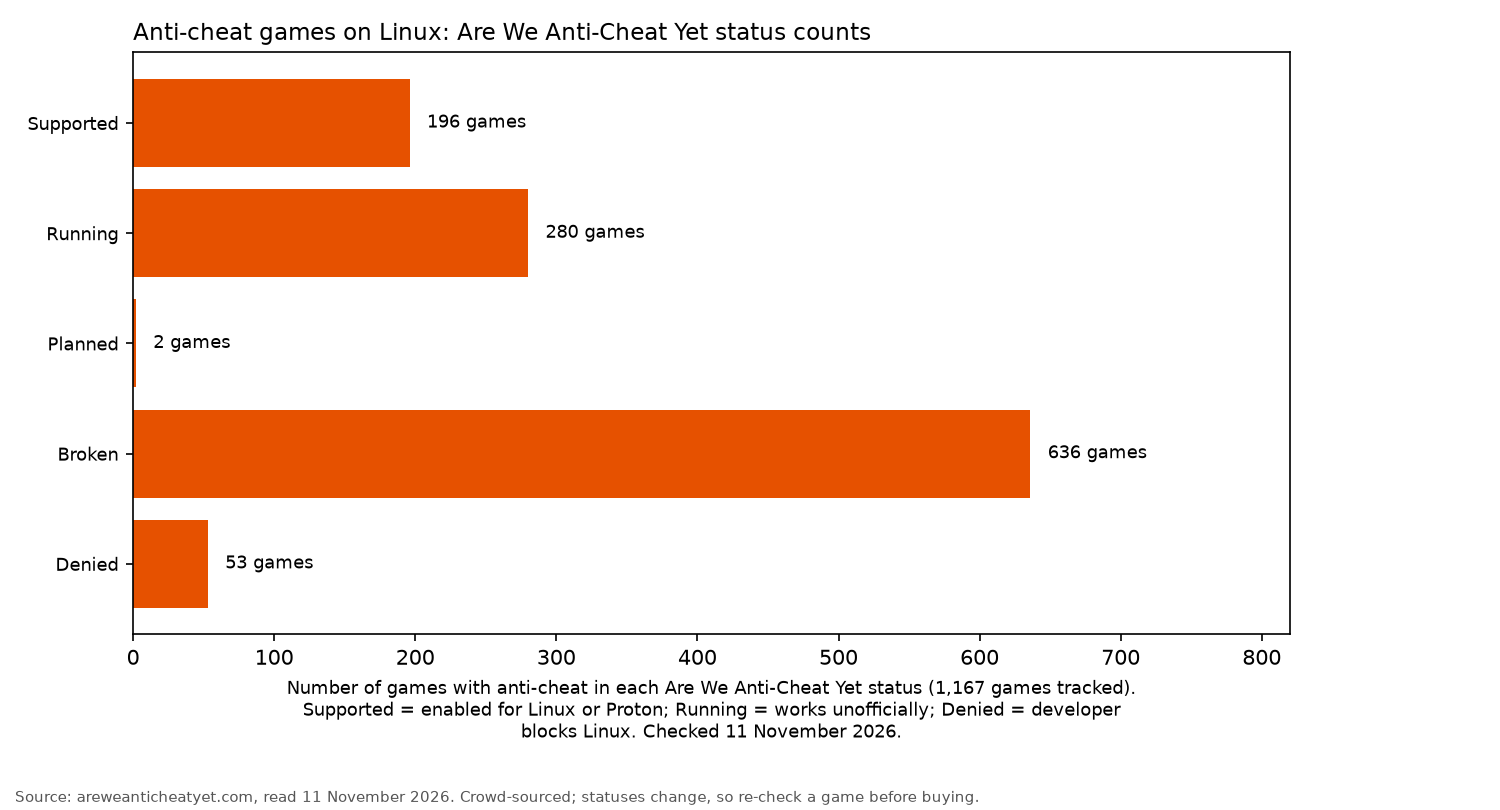
Of the 1,167 anti-cheat games tracked by AWACY on 11 November 2026, 196 were Supported and 280 Running. Another 636 were Broken and 53 Denied. Many of the broken games are not shooters most players would miss, but the big competitive titles in the table are the ones people ask about.
Deadlock is Supported. Are We Anti-Cheat Yet's data also sets a native flag, but the Steam store page does not list a Linux build, checked on 11 November 2026. This guide does not call Deadlock a native game. Counter-Strike 2 and Team Fortress 2 do list Linux on Steam.
Apex Legends stays Denied. AWACY records that Linux support was disabled on 31 October 2024. ProtonDB's summary on 11 November 2026 was still Silver, with the recent trend at Bronze, across 1,793 reports. That aggregate includes older reports. This guide follows the anti-cheat status and does not treat Apex as a Linux game to buy.
If the game you play most is Denied, Linux isn't a viable way to play it right now. Keep Windows or a console for that game, or consider a cloud service if the publisher permits it.
Beyond Steam: Lutris, Heroic and Proton-GE
- Lutris manages games outside Steam, including Battle.net and other launchers, according to tuxai.dev.
- Heroic Games Launcher lets you run games from Epic Games Store and GOG libraries.
- Proton-GE is a community build from GloriousEggroll. According to tuxai.dev, it includes "patches Valve hasn't merged yet", extra media codecs for cutscenes and fixes for individual games. Valve does not make it. Try it when ProtonDB reports indicate that a game needs it.
For free shooters with native Linux builds, browse the best open-source FPS games guide or the open-source games hub.
Hardware that behaves on Linux
- Graphics card: best GPU for Linux gaming
- Controller: best controller for Linux gaming
- Headset: best gaming headset for Linux
- Mouse: best gaming mouse for Linux
- Keyboard: best mechanical keyboard for FPS gaming
- Steam Deck: best Steam Deck accessories
Find more recommendations in the gear section.
Troubleshooting basics
- Force a different Proton version through the game's Compatibility settings. ProtonDB reports often specify which version works.
- Copy launch options from recent ProtonDB reports into the game's Properties.
- Update your GPU driver and kernel before trying fixes for individual games.
- Check the anti-cheat status if a multiplayer game opens but won't connect to matches.
- Read the Proton issue tracker on GitHub to check for known bugs.
FAQ
Can Linux run all Steam games?
No. Most run through Proton, but games with anti-cheat marked Broken or Denied by AWACY, including Valorant and Battlefield 6, do not. Apex Legends is Denied there too. ProtonDB's aggregate for Apex was still Silver on 11 November 2026, with the recent trend at Bronze, so this guide follows the anti-cheat status.
How do I enable Proton?
In Steam, open Settings, select Compatibility, then tick "Enable Steam Play for all other titles".
What do ProtonDB Platinum and Gold mean?
Platinum means a game works out of the box. Gold means it runs well after minor tweaks. ProtonDB's own wording is "runs perfectly out of the box" for Platinum and "runs perfectly after tweaks" for Gold.
Why won't Valorant or PUBG run on Linux?
AWACY marks Valorant's Vanguard as Denied and PUBG as Broken. ProtonDB's summary for PUBG was Borked on 11 November 2026. Valorant is not a Steam game, so ProtonDB has no page for it.
Is Proton-GE safe?
It is a widely used community build rather than a Valve release. Only download it from its official GitHub releases.
Which distro is best for gaming?
Any current distro with a recent kernel and GPU driver will work. tuxai.dev points to distros offering a gaming edition with Steam, Lutris and Heroic included.
More from OpenFrag: Gear · History · How we review