Best Linux Gaming Laptop
The best Linux gaming laptop in the UK: ASUS, Lenovo and Acer on Amazon, plus Framework, System76 and TUXEDO direct, with a Linux readiness table.
Published . Updated . 8 min read.

The best Linux gaming laptop for most players is the ASUS ROG Zephyrus G14 with a Ryzen 9 270 and RTX 5060. Its MUX switch lets the Nvidia GPU drive the screen directly, while the community asus-linux project provides Linux support for ROG laptops.
For an all-AMD laptop without an Nvidia driver to manage, the Framework Laptop 16 with the Radeon RX 7700S module is the pick. It's sold direct. If you'd rather buy a laptop with Linux already installed, System76 and TUXEDO are the options.
This roundup draws on gamingpcguru's Linux gaming laptop list, WIRED's best Linux laptops, Laptop Compass, Nvidia's open kernel module announcement, the ArchWiki PRIME page, asus-linux.org, manufacturer pages and Amazon UK listings.
Laptop configurations change quickly, so each recommendation specifies the exact configuration checked. We have not tested these laptops ourselves.
Quick picks
- Best overall: ASUS ROG Zephyrus G14 (Ryzen 9 270, RTX 5060, MUX switch)
- Best repairable, all-AMD option: Framework Laptop 16 (sold direct, no Amazon listing)
- Best that ships with Linux: System76 Oryx Pro or a TUXEDO laptop (sold direct)
- Best Nvidia value: Lenovo Legion 5 Gen 10 (Ryzen 7 260, RTX 5060)
- Best budget: Acer Nitro V16 ANV16-42 (Ryzen 5 240, RTX 5050)
We may earn a commission if you buy through links on this page. It never changes our verdicts. How we review.
ASUS ROG Zephyrus G14 (Ryzen 9 270, RTX 5060)
Check price on AmazonLenovo Legion 5 Gen 10 (Ryzen 7 260, RTX 5060)
Check price on AmazonLinux readiness table
Most gaming laptops combine an AMD or Intel processor's built-in graphics with a dedicated Nvidia GPU. On Linux, this is known as hybrid graphics.
Normally, the built-in GPU drives the screen while games run on the Nvidia card through PRIME render offload, as explained by the ArchWiki. A MUX switch changes that by allowing the Nvidia GPU to drive the screen directly.
Nvidia says its Blackwell GPUs, including the RTX 50 series, require open-source kernel modules. Its proprietary modules are not supported on these GPUs.
| Laptop and configuration checked | GPU | Driver path on Linux | MUX or hybrid notes | Wi-Fi | Ships with Linux | Source checked |
|---|---|---|---|---|---|---|
| ASUS ROG Zephyrus G14, Ryzen 9 270, RTX 5060 | Nvidia RTX 5060 | Nvidia open kernel modules | MUX switch and Advanced Optimus, per the listing; asus-linux tools switch graphics modes | Wi-Fi 7 in the product information; chip not named | No | Amazon UK listing, asus-linux.org, Nvidia |
| Lenovo Legion 5 Gen 10, Ryzen 7 260, RTX 5060 | Nvidia RTX 5060 (115W TGP) | Nvidia open kernel modules | MUX not mentioned on the listing; plan on PRIME offload | Wi-Fi 6, 2x2 | No | Amazon UK listing, Nvidia |
| Acer Nitro V16 ANV16-42, Ryzen 5 240, RTX 5050 | Nvidia RTX 5050 | Nvidia open kernel modules | MUX not mentioned; plan on PRIME offload | 802.11ax in the product information; chip not named | No | Amazon UK listing, Nvidia |
| Lenovo LOQ Essential, Ryzen 7 170, RTX 3050 | Nvidia RTX 3050 6GB (Ampere) | Nvidia open modules recommended | MUX not mentioned; plan on PRIME offload | Wi-Fi 6 | No | Amazon UK listing, Nvidia |
| Framework Laptop 16 | AMD Radeon RX 7700S or Nvidia RTX 5070 module | AMD: in-kernel amdgpu and Mesa; Nvidia: open modules | Swappable graphics module | AMD RZ717 Wi-Fi 7 | DIY Edition: bring your own OS, including Linux | frame.work |
| System76 Oryx Pro | Nvidia RTX 5060 | Set up by System76 | Configured by the maker | See maker page | Yes | system76.com |
What matters in a Linux gaming laptop
- AMD or Nvidia graphics. gamingpcguru considers AMD the safer choice because its open-source driver is built into the kernel and Mesa. Driver updates therefore arrive through your Linux distro. Nvidia has improved considerably with its open kernel modules, according to the same source.
- Hybrid graphics and the MUX switch. Without a MUX switch, the built-in GPU drives the screen while games run on the dedicated GPU through PRIME offload. With a MUX, the dedicated GPU can drive the panel directly.
- Kernel and Mesa versions. gamingpcguru calls Ubuntu 24.04 LTS the safest choice for broad hardware compatibility, and notes that Fedora 40 has newer kernel and Mesa versions, which helps newer GPUs.
- Wi-Fi chip. Laptop Compass rates Wi-Fi support separately because a poorly supported chip can spoil an otherwise good Linux laptop. Most Amazon listings don't identify the exact chip. Check it with
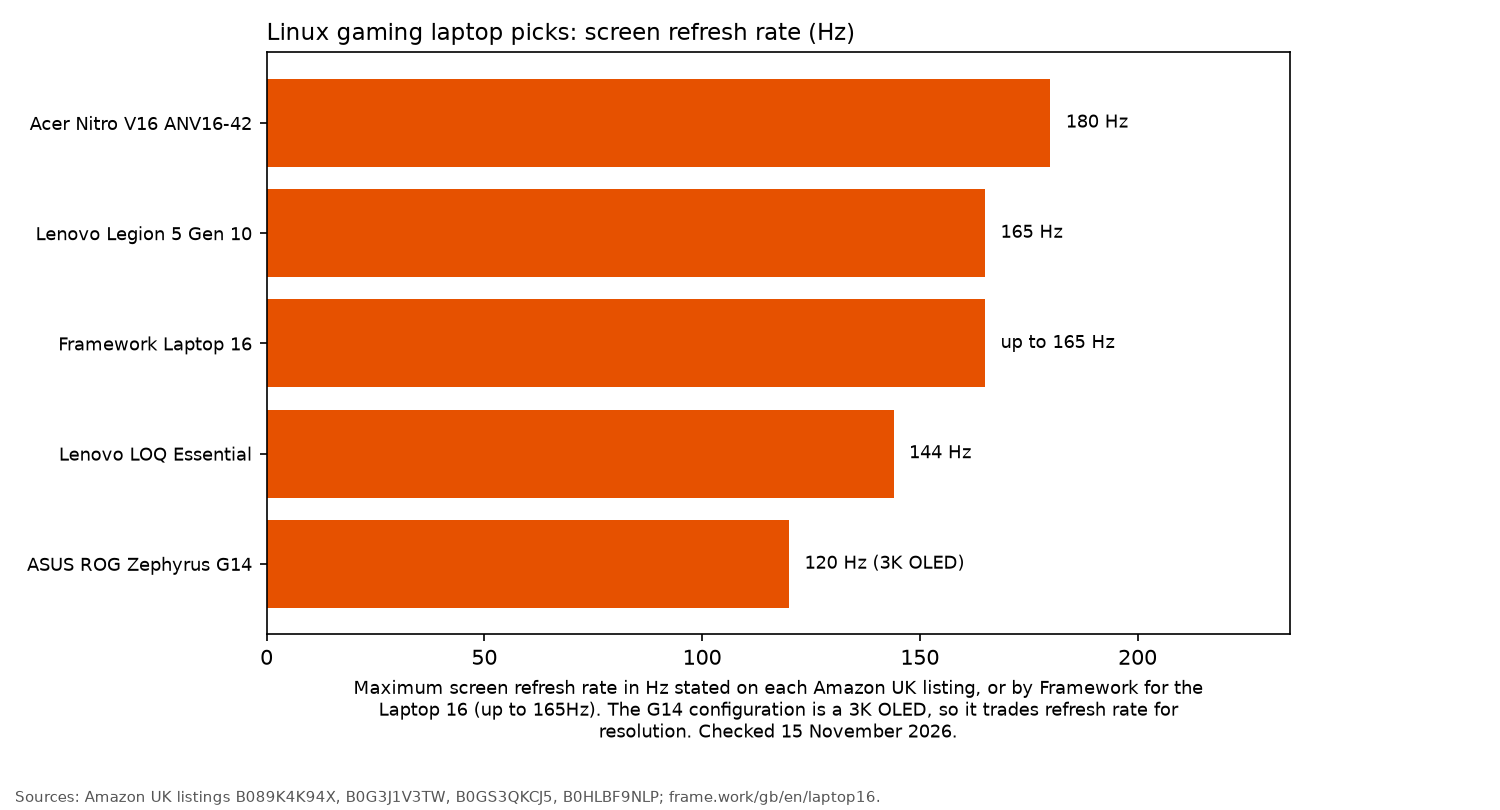
lspciwhen the laptop arrives, and keep the returns window in mind. - Screen. A high refresh rate is useful only if the GPU can keep up. The chart shows the stated refresh rates for these configurations.
The picks
ASUS ROG Zephyrus G14: best overall
The listed configuration combines a Ryzen 9 270 and RTX 5060 with a 14-inch 2880 by 1800 OLED screen running at 120Hz. It also has 16GB of LPDDR5X memory and a 1TB PCIe 4.0 SSD.
The listing confirms a MUX switch and Nvidia Advanced Optimus. For Linux, the tools from asus-linux.org allow ROG laptop owners to switch between integrated and dedicated graphics, adjust fan curves and control keyboard lighting.
This is a third-party offer for a US-origin unit with a US English keyboard. Check delivery, returns and any import charges at checkout.
Who it's for: players looking for a portable 14-inch laptop with Nvidia graphics and useful Linux community tools. Who it isn't for: anyone who would rather avoid Nvidia drivers entirely.
Check price on AmazonFramework Laptop 16: best repairable, all-AMD option
Framework sells the Laptop 16 directly, with a choice of Radeon RX 7700S or GeForce RTX 5070 graphics. Both come as modules that can be swapped using the single tool included in the box.
The manufacturer's specifications include a 2560 by 1600 display with a refresh rate of up to 165Hz, an AMD RZ717 Wi-Fi 7 module, two SO-DIMM slots and two M.2 slots.
The DIY Edition allows you to install your own operating system, including Linux. WIRED also notes that Framework officially supports Ubuntu and Fedora.
Choose the RX 7700S module if you want to use AMD's in-kernel graphics driver.
Who it's for: players who want the option to upgrade their GPU later without dealing with Nvidia drivers. Who it isn't for: anyone after a slim, lightweight laptop. Framework lists a weight of 2.4kg with the graphics module installed.
Buy from frame.work. There's no Amazon listing, so no button.
System76 and TUXEDO: best that ships with Linux
System76's Oryx Pro comes with a Ryzen AI 7 450, RTX 5060 and a 2K 300Hz display, according to its laptop page. Linux is already set up when the machine arrives.
TUXEDO sells Linux laptops from within the EU, with VAT included in the price, according to Laptop Compass. The same source notes that its fans can be loud under load.
Both manufacturers have a long history of supporting Linux, something WIRED highlights in its recommendations.
Who it's for: players who prefer the manufacturer to handle Linux driver setup. Who it isn't for: UK buyers who want to order through Amazon. Both manufacturers sell directly, and System76 displays prices in US dollars.
Buy from system76.com or tuxedocomputers.com. No Amazon button.
Lenovo Legion 5 Gen 10: best Nvidia value
This Legion 5 configuration pairs a Ryzen 7 260 with an RTX 5060 rated at 115W. The screen is listed as 15.5 inch in the title and 15.3 inch in the spec field; confirm the panel size at checkout. The listing also gives a 1920 by 1200 resolution at 165Hz, 16GB of DDR5 in one SO-DIMM slot, a 512GB SSD and Wi-Fi 6.
gamingpcguru recommends an earlier Legion 5 Pro as its best-value Linux gaming laptop.
The listing doesn't mention a MUX switch, so plan to use PRIME offload for Nvidia graphics on Linux.
Who it's for: players who want a powerful GPU for the money and a larger laptop than the 14-inch G14, after confirming the panel size at checkout. Who it isn't for: anyone who needs plenty of storage from day one.
Check price on AmazonAcer Nitro V16 ANV16-42: best budget
The listed Nitro V16 configuration has an AMD Ryzen 5 240 processor, RTX 5050 graphics, 16GB of DDR5 memory and a 512GB SSD. Its 1920 by 1200 display runs at 180Hz.
For a cheaper alternative, there's the Lenovo LOQ Essential with a Ryzen 7 170 and an RTX 3050 6GB. Its listing also confirms Wi-Fi 6 and a 144Hz display.
Who it's for: players buying their first Linux gaming laptop, particularly for lighter or older games. Who it isn't for: anyone expecting to run new releases at high settings.
Acer Nitro V16 ANV16-42 (Ryzen 5 240, RTX 5050)
Check price on AmazonLenovo LOQ Essential (Ryzen 7 170, RTX 3050)
Check price on AmazonAnti-cheat box
A capable laptop doesn't guarantee that every game will run on Linux. Some multiplayer titles block Linux through their anti-cheat systems.
Before buying a laptop for a particular game, check its status on Are We Anti-Cheat Yet and ProtonDB. The Linux gaming guide covers more of the basics.
More from OpenFrag: Gear hub, GPUs for Linux gaming, controllers for Linux and headsets for Linux.
FAQ
Is AMD or Nvidia better for a Linux gaming laptop?
AMD is generally simpler because its graphics driver is included in the kernel and Mesa. Nvidia also works well with its open kernel modules, which are required for RTX 50 series GPUs.
Do Nvidia Optimus laptops work on Linux?
Yes. The built-in GPU drives the display, while PRIME render offload sends games to the Nvidia GPU. If the laptop has a MUX switch, the Nvidia GPU can drive the screen directly instead.
Can you game on a Linux laptop with Proton?
Yes. According to gamingpcguru, Proton translates DirectX 11 and 12 calls into Vulkan, allowing most Windows games to run. Check ProtonDB for compatibility with individual games.
Which laptops ship with Linux?
System76 and TUXEDO sell laptops with Linux already installed. Framework's DIY Edition allows you to install Linux yourself.
Does anti-cheat work on Linux?
It works for some games. Are We Anti-Cheat Yet tracks which titles are supported, running, broken or denied on Linux.
More from OpenFrag: Gear · How we review