Best microSD Card for Steam Deck and Linux Handhelds
Best microSD card for Steam Deck in 2026: UHS-I A2 picks from Samsung, Lexar and SanDisk, plus capacity advice and Linux formatting tips.
Published . Updated . 13 min read.
For most people, the best microSD card for Steam Deck is a genuine UHS-I microSDXC card with a U3 and V30 rating. The Samsung PRO Plus, Lexar Silver Plus and SanDisk Extreme are all good options. A2 is a useful bonus, but capacity matters more when choosing a card for a game library. There is no need to pay extra for microSD Express.
Stick to Amazon itself or the card manufacturer when buying. Fake cards are common, and buying from a third-party seller increases the risk. On 6 November 2026 the Samsung PRO Plus button below was the Sonic retail pack, and both that 1TB listing and the unlinked 512GB listing showed only 2 left.
We may earn a commission if you buy through links on this page. It never changes our verdicts. How we review.
Quick picks
All of the buttons below go to Amazon UK. Listings were checked on 6 November 2026. None of them is a microSD Express card.
Best for most: Samsung PRO Plus 1TB, Sonic pack (MB-MD1T0SA/LC1). The listing showed only 2 left, with more on the way.
Check price on AmazonFastest for PC transfers (Engadget's tests): Lexar Professional Silver Plus 512GB. The listing showed 15 left.
Check price on AmazonMainstream 1TB alternative: SanDisk Extreme 1TB. The listing showed in stock, and its title includes UHS-I, V30, U3 and A2.
Check price on AmazonBudget capacity: Samsung EVO Select 1TB (2024). The listing showed in stock.
Check price on AmazonGaming-oriented UHS-I: Lexar PLAY 512GB. The listing showed only 6 left. This is the UHS-I PLAY card, not the PLAY PRO Express model.
Check price on AmazonOptional: SanDisk Gameplay 512GB, another SanDisk card with gaming branding. The button is with that pick below. The title does not say it is licensed for Steam Deck.
Skip: microSD Express. Valve lists a UHS-I slot on both the OLED and LCD Steam Deck, so an Express card is not a speed upgrade. There is no Express button on this page.
What the Steam Deck actually uses
Valve's OLED tech specs and the LCD tech specs both list the microSD slot as UHS-I, supporting SD, SDXC and SDHC. That connection sets the speed limit, whatever number is printed on the packet.
RottenWifi and NP Handhelds explain the marks Deck owners actually need:
- U3: a UHS speed class tied to sustained write speed.
- V30: a video speed class that also describes sustained write performance.
- A2: an application performance class for the small random reads and writes made by apps. NP Handhelds notes that A2 features need support from the device, and it is not clear the Deck uses all of them. Treat A2 as a sign of a current card, not as a promise of faster games.
A large figure such as "up to 180 MB/s" is an advertised peak read. Samsung's 2024 PRO Plus datasheet says that peak was measured with a Samsung reader. On the plain UHS-I SDR104 bus, the same sheet lists up to 104 MB/s. NP Handhelds makes the same point for the Deck: the slot cannot reach the biggest numbers on the packet. Those numbers are more useful for judging a PC transfer, with a fast reader, than for predicting how a game will run.
NP Handhelds also says a UHS-II card still runs at UHS-I speed in the Deck, so there is no reason to pay extra for that bus either. This page does not link UHS-II or Express cards as Deck upgrades.
Spec table
Rows were checked against the UK listing, or against Samsung's PRO Plus datasheet, on 6 November 2026. Advertised peak reads are not Steam Deck throughput. Confirm the seller is Amazon or the card maker before you buy.
| Card | Capacity on button | Bus and class marks | Advertised peak read | Warranty note | Best for | ASIN |
|---|---|---|---|---|---|---|
| Samsung PRO Plus, Sonic pack (MB-MD1T0SA/LC1) | 1TB | UHS-I, U3, V30, A2 (listing technical specifications). Same marks on the PRO Plus datasheet for the lineup. | Up to 180 MB/s (listing and datasheet, with a Samsung reader) | Listing and datasheet: 10 year limited warranty. Datasheet excludes write-intensive uses such as dashcams and CCTV. Only 2 left, more on the way. | Best for most | B0DQTZDMKS |
| Samsung PRO Plus, Sonic pack (MB-MD512SA/LC1) | 512GB, no button | UHS-I, U3, V30, A2 (listing technical specifications) | Up to 180 MB/s (listing) | Amazon Global Store. The listing says the manufacturer warranty will not apply. Only 2 left. | Not linked | B0DQTZ4CXR |
| Lexar Professional Silver Plus | 512GB | UHS-I, C10, U3, V30, A2 (listing title). Engadget lists the same marks. | Up to 205 MB/s (listing and Engadget) | Listing and Engadget: limited lifetime warranty. 15 left on the UK listing. | Fastest for PC transfers in Engadget's UHS-I tests | B0DKHC5G3T |
| SanDisk Extreme | 1TB | UHS-I, V30, U3, C10, A2 (this listing's title) | Up to 190 MB/s (listing) | Check SanDisk's warranty terms. Listing showed in stock. | Mainstream 1TB alternative | B09X7MPX8L |
| Samsung EVO Select (2024) | 1TB | UHS-I U3 (listing title). Description also mentions A2 and V30. | Up to 160 MB/s (listing title) | A listing footnote says speed and rating apply to the 128GB, 256GB and 512GB cards. Check Samsung's warranty. Listing showed in stock. | Budget capacity | B0CVGYNC97 |
| Lexar PLAY | 512GB | UHS-I (listing title). Description says A1 or A2, not one mark. | Up to 150 MB/s (listing) | Check Lexar's warranty. Only 6 left. Not the PLAY PRO Express card. | Gaming-oriented UHS-I pick | B08PCGC71B |
| SanDisk Gameplay | 512GB | V30, A2, U3 (listing title). The speed note describes rates above the UHS-I 104 MB/s baseline, so this is not an Express card. | Up to 190 MB/s (listing) | Check SanDisk's warranty. Title does not say it is licensed for Steam Deck. Listing showed in stock. | Gaming-branded SanDisk | B0CRHWRX8C |
| microSD Express (any) | n/a | Express. Not a Deck upgrade. The slot is UHS-I. | High maker claims | n/a | Skip for Steam Deck storage | no button |
The picks
Samsung PRO Plus 1TB: best for most
The Samsung PRO Plus is the sensible mainstream card. NP Handhelds calls a 512GB or 1TB PRO Plus the best choice for most Deck owners, and lists it as U3, V30 and A2 with a limited 10 year warranty. Engadget keeps a Samsung Pro Plus as the runner-up behind the Lexar Silver Plus.
Samsung's 2024 datasheet for the PRO Plus lineup (1TB model code MB-MD1T0S) lists UHS-I, Class 10, U3, V30 and A2, with sequential read up to 180 MB/s and write up to 130 MB/s when the card is used with a Samsung reader. The 10 year limited warranty in that sheet does not cover write-intensive devices such as dashcams, CCTV and continuous recording.
The Amazon UK button is not a plain blue retail box. It is the Sonic PRO Plus, model MB-MD1T0SA/LC1. The listing's own technical specifications repeat UHS-I, U3, V30 and A2, and up to 180 MB/s read. On 6 November 2026 it showed only 2 left in stock, with more on the way. Confirm the seller is Amazon or Samsung.
The listing also mentions Samsung Magician for an authenticity check. The same listing says that software is for Windows and macOS, so it is not a SteamOS tool. On Linux, use f3 before you fill the card.
Who it is for: players who want a familiar brand and enough storage for a large library.
Who should skip it: anyone who keeps only a few games installed, or anyone who cannot confirm the seller.
A 512GB Sonic pack also exists (MB-MD512SA/LC1, ASIN B0DQTZ4CXR). On 6 November 2026 that listing showed only 2 left, and it was marked Amazon Global Store. The page says international products are sold from abroad and that the manufacturer warranty will not apply. There is no button for it here.
Check price on AmazonLexar Silver Plus 512GB: fastest for PC transfers
Engadget calls the Lexar Professional Silver Plus the best value of the UHS-I cards it tested, and the fastest for sequential reads and writes. Those results used Lexar's USB reader, not a Steam Deck. Engadget lists the marks as U3, V30, A2 and Class 10, rates it up to 205 MB/s read and 150 MB/s write, and cites a limited lifetime warranty. The UK listing title for this 512GB card carries the same marks and the same 205 MB/s read claim, and the listing text also says it has a limited lifetime warranty.
Engadget lists capacities up to 1TB. The button here is the 512GB UK listing that was checked. On 6 November 2026 it showed 15 left. Confirm the seller is Amazon or Lexar. The Deck's UHS-I slot will not deliver the 205 MB/s figure.
Who it is for: anyone who regularly copies games or media between a PC and a handheld, and who has a reader that can use the card's peak.
Who should skip it: buyers who want 1TB on this particular button. The checked UK listing is 512GB.
Check price on AmazonSanDisk Extreme 1TB: mainstream 1TB alternative
The SanDisk Extreme is the other mainstream Deck card in both NP Handhelds and RottenWifi. The UK listing for this 1TB ASIN showed in stock on 6 November 2026. Its title says UHS-I, V30, U3, C10 and A2, with read speeds up to 190 MB/s. The listing's own note says those peaks need a compatible device and sit above the ordinary UHS-I 104 MB/s baseline.
SanDisk has more than one Extreme 1TB card. This button is ASIN B09X7MPX8L only. Read the title in the basket, and read SanDisk's warranty terms, before you pay. Confirm the seller is Amazon or SanDisk.
Who it is for: buyers who want a 1TB card from a major brand, including when the Samsung PRO Plus listing is nearly out of stock.
Who should skip it: anyone who does not want to check the exact SKU. The marks above are for this ASIN's title, not for every card with Extreme on the packet.
Check price on AmazonSamsung EVO Select 1TB: budget capacity
Samsung's EVO Select (2024) is the cheaper microSDXC line. The 1TB UK listing, model MB-ME1T0SA/EU, showed in stock on 6 November 2026. The title says UHS-I U3 and up to 160 MB/s read. The description also mentions A2 and V30, but a footnote says speed and rating apply to the 128GB, 256GB and 512GB cards. Check the title of the card you are actually buying.
The attraction is capacity, not the highest advertised read in this set. NP Handhelds lists the EVO Select as the budget pick.
Who it is for: players who want a lot of storage and tend to install a game once.
Who should skip it: people who often move large folders between the card and a PC. The PRO Plus and Silver Plus listings advertise higher peak reads.
See Samsung's warranty terms for the card you buy, and confirm the seller is Amazon or Samsung. Other EVO Select capacities are not linked here.
Check price on AmazonLexar PLAY 512GB: gaming-oriented UHS-I
The Lexar PLAY is a UHS-I card marketed for portable gaming. This 512GB UK listing, model LMSPLAY512G-BNNAG, advertises read speeds up to 150 MB/s. The description talks about A1 or A2 performance rather than one fixed mark, so do not assume A2 until you see it on the card you receive.
Do not confuse it with the Lexar PLAY PRO. That model is microSD Express, and Express does not make the Steam Deck faster. On 6 November 2026 this UHS-I listing showed only 6 left. Confirm the seller is Amazon or Lexar, and check Lexar's warranty terms.
Who it is for: anyone looking for a mid-capacity Lexar card sold for gaming, on the UHS-I bus the Deck actually has.
Who should skip it: buyers chasing the highest advertised read in this set, or anyone who might mix this card up with a PLAY PRO Express pack.
Check price on AmazonSanDisk Gameplay 512GB: optional pick
SanDisk Gameplay is another gaming-branded card. The UK listing title includes V30, A2 and U3, and advertises read speeds up to 190 MB/s. Its speed note describes performance above the UHS-I 104 MB/s baseline on a compatible device, which is how these UHS-I cards are sold. It is not a microSD Express listing.
The title does not say the card is licensed for Steam Deck, so there is no reason to treat it as a Valve-approved part. The listing showed in stock on 6 November 2026. Check the speed-class marks in the basket and SanDisk's warranty terms, and confirm the seller is Amazon or SanDisk.
Check price on AmazonHow many games fit on each card?
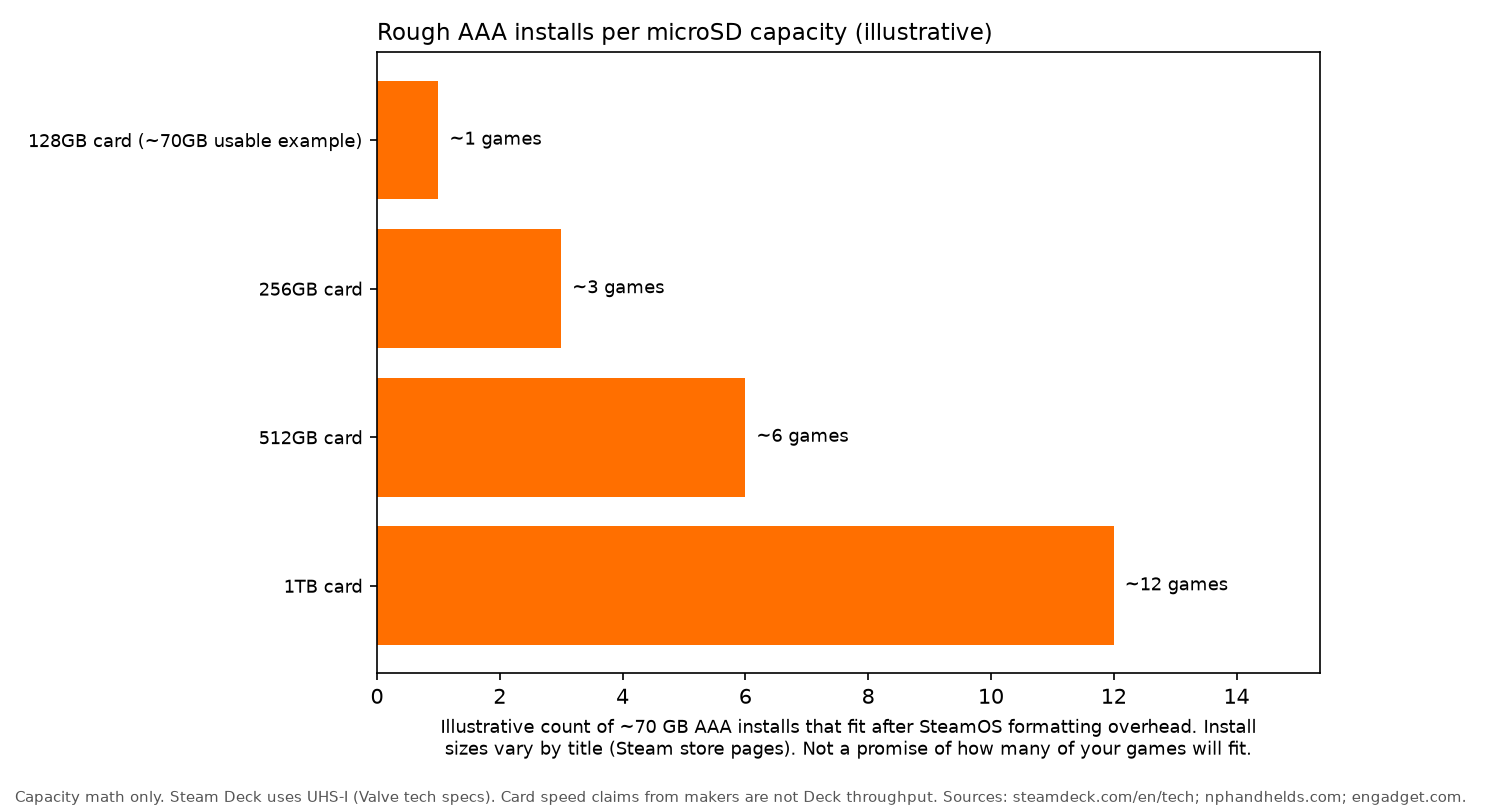
Game sizes vary. A current AAA release can take tens of gigabytes, and many indie games take a few. The chart above is capacity maths, not a measurement on a Deck and not a promise of how many of your games will fit. It assumes about 70 GB for one AAA install after formatting overhead:
- 128GB: about 1
- 256GB: about 3
- 512GB: about 6
- 1TB: about 12
Mixing smaller games with large ones fits more titles on the same card. Check the install size on each game's Steam store page. Samsung's PRO Plus datasheet also says usable capacity can be lower than the number on the label, and that its own user-capacity figure was measured with a FAT formatter. SteamOS uses ext4, so treat the chart as a rough sketch.
For a library of large releases, 1TB is a practical starting point. If most of the games are small, 512GB can be enough.
Linux notes: formatting, sharing and fake cards
Format in SteamOS. Valve's FAQ says Steam Deck microSD cards use ext4 with casefolding, and that the Deck formats the card to that layout. Formatting erases the card, so copy off anything you need first. The same FAQ says the Deck can boot from microSD.
ext4 and exFAT. SteamOS uses ext4. exFAT is the more convenient choice when the same card has to be read on Windows, macOS and Linux. If you move files between a handheld and a desktop, use a separate card or drive for those transfers and leave the games card formatted by SteamOS.
Check for fakes. The Linux tool f3 can check whether a card really has the capacity it claims. Run it on a PC before you fill a new card. The same check is worth doing for a ROG Ally running Bazzite. Samsung's listing points to Samsung Magician for an authenticity check, and that program is for Windows and macOS, not SteamOS.
FAQ
Does SD card speed matter on Steam Deck?
Yes, but only up to a point. Valve's OLED specs and LCD specs both list a UHS-I microSD slot, so the maximum MB/s figure on a card is not the speed the handheld can reach. NP Handhelds still treats U3, V30 and A2 as the ratings to check, and notes that A2 features need host support the Deck may not fully use.
Is 512GB enough?
It depends on how many games you install and how large they are. The chart on this page is an illustration that assumes about 70 GB per AAA install after formatting overhead: about 6 games on 512GB and about 12 on 1TB. It is not a count of your library. Check each game's install size on its Steam store page.
Do games run slower from microSD?
Not as a lower average frame rate, in the comparisons NP Handhelds summarises. It points to PC Gamer's report of early Linus Tech Tips and The Phawx tests: Control, Dead Cells and Street Fighter 5 loaded almost identically from the card and the internal SSD, while Portal 2 and Ghostrunner took about 10 to 17 seconds longer. NP Handhelds also describes a Steam Deck HQ comparison in which average frame rates stayed within the margin of error and some load times were longer.
Can Steam Deck use microSD Express?
Not as a speed upgrade. Valve's OLED specs and LCD specs both list a UHS-I slot. NP Handhelds says to skip microSD Express, and says a UHS-II card also runs at UHS-I speed in the Deck. This guide has no Express buy button.
How do I format a card on Steam Deck?
Use the formatter in SteamOS. Valve's FAQ says the Deck formats microSD cards as ext4 with casefolding, and that it can boot from microSD. Formatting erases the card, so copy off anything you need first.
More Linux gaming gear
More hardware guides: all gear guides, best controller for Linux gaming, best gaming headset for Linux, best gaming mouse for Linux and best graphics card for Linux gaming. Read how we review.