Best 1440p Gaming Monitor for FPS, Plus Linux and SteamOS Notes
The best 1440p gaming monitor picks for 2026, from 360Hz QD-OLED to budget Fast IPS, with Linux, SteamOS and VRR notes on every model.
Published . Updated . 17 min read.
For most PC players in 2026, the best 1440p gaming monitor is a 27 inch QD-OLED at 240Hz or higher. This guide compares ten current UK listings using maker specifications, named reviews and the ArchWiki. It is an aggregator guide. OpenFrag did not measure these panels.
Every pick has a Linux, SteamOS and variable refresh rate note. A port label is not a promise of full refresh. HDMI 2.1 can still be the older TMDS bandwidth, DisplayPort 1.4 often needs display stream compression (DSC) for the top refresh, and a USB-C dock can drop the rate when it keeps USB 3 data on the same cable.
Buttons go to Amazon UK. Listings were checked on 7 November 2026. Amazon prices are not printed. Some pages also showed Amazon Resale, used offers, or a third-party seller. Choose a new offer. Stock and sellers change, so look again before Black Friday on 27 November 2026.
We may earn a commission if you buy through links on this page. It never changes our verdicts. How we review.
Quick picks
Best competitive: Alienware AW2725DF, a 360Hz QD-OLED.
Offer check, 7 November 2026: the new offer was in stock and sold by Amazon. Dell lists 360Hz on DisplayPort and limits HDMI to 144Hz. Dell's specification does not list a DSC on/off control, and this guide does not claim that one is available.
Check price on AmazonBest for most: Alienware AW2725D, a 280Hz QD-OLED. TechSpot named it the top overall pick in a budget 1440p OLED roundup. That is a US review, not a UK price claim.
Offer check, 7 November 2026: the UK listing showed new and used offers. Choose a new offer, not a used offer and not Amazon Resale. The featured seller was not confirmed, so do not assume this is sold by Amazon.
Check price on AmazonBest value 240Hz: MSI MAG 271QPX QD-OLED E2.
Offer check, 7 November 2026: the in-stock offer was from the marketplace seller Wholesale Supplies. It was not sold by Amazon, and it was not labelled Amazon Resale. Confirm the unit is new.
Check price on AmazonBest bright room: LG UltraGear OLED 27GX704A, a WOLED with MLA+.
Offer check, 7 November 2026: a new offer sold by Amazon was in stock, and a separate Amazon Resale offer was on the same page. Choose the new offer. Amazon Resale is not the new listing.
Check price on AmazonBest budget IPS: ASUS ROG Strix XG27ACSR, a 220Hz overclock Fast IPS. The model number on that listing, 90LM0D10-B01171, matches ASUS UK.
Offer check, 7 November 2026: the in-stock offer was from the marketplace seller Realtime Distribution. It was not sold by Amazon, and it was not labelled Amazon Resale. Confirm the unit is new.
Check price on AmazonWhat actually sets the refresh rate
At about 27 inches, 2560x1440 shows more detail than 1080p and asks the GPU for fewer pixels than 4K. The maker refresh rates here run from 220Hz to 360Hz. The game still has to produce enough frames. Quoted 0.03 ms grey-to-grey times are manufacturer claims, not OpenFrag measurements.
OLED gives high contrast and a fast pixel response. IPS avoids the same burn-in worry on a static Linux desktop, with much lower contrast. Gigabyte's MO27Q2A specification names the panel type as QD-OLED. Where a maker page only says OLED, this guide does not invent a subtype.
For Linux variable refresh rate, start with the ArchWiki VRR page. It says the monitor should be connected by DisplayPort. Some HDMI 2.1 displays also do VRR: the Nvidia driver supports that path, and the AMD driver has supported HDMI VRR since kernel 5.13. Nvidia cards older than the 10 series do not support G-SYNC Compatible monitors. On Wayland, Nvidia VRR with the proprietary driver needs a Volta GPU or newer, and driver 525 or later. A compositor such as Sway, Hyprland or KDE still has its own switch. Some monitors only offer VRR below their maximum refresh.
Valve's official dock lists DisplayPort 1.4 and HDMI 2.0, up to 4K at 60Hz or 1440p at 120Hz, with FreeSync. That ceiling is below every panel maximum in this guide. A Steam Deck or other SteamOS handheld will not drive these screens at 220Hz to 360Hz in demanding games, even when the dock passes VRR. Third-party docks differ. Read the dock's HDMI or DisplayPort version, and whether USB-C video is DisplayPort Alt Mode.
Comparison
Port rows come from the maker page or manual linked in each section, checked on 7 November 2026. The chart under the table is maker-stated maximum refresh at 2560x1440. It is not a lab measurement, and it does not show the lower rate on a limited HDMI or dock path.
| Monitor | Panel | Maker max at 1440p | Video inputs | VRR named by the maker | Linux and SteamOS |
|---|---|---|---|---|---|
| Alienware AW2725DF | QD-OLED | 360Hz on DisplayPort, 144Hz on HDMI | 2x DP 1.4, 1x HDMI 2.1 at TMDS bandwidth. USB-C is data only | FreeSync Premium Pro, VESA Adaptive Sync | Use DisplayPort for 360Hz. HDMI is 144Hz. Dell's spec does not list a DSC control. Official Deck dock stops at 1440p 120Hz |
| Alienware AW2725D | QD-OLED | 280Hz on DP 1.4 and on HDMI 2.1 FRL | 1x DP 1.4 with DSC, 2x HDMI 2.1 FRL. USB-C is data and 15W, not video | FreeSync Premium Pro, G-SYNC Compatible, VESA Adaptive Sync | Same VRR path as the AW2725DF. Command Center is Windows software |
| MSI MAG 271QPX E2 | QD-OLED | 240Hz on DP, HDMI and USB-C | DP 1.4a, 2x HDMI 2.1, USB-C DP Alt with 15W | FreeSync Premium Pro | DSC can be switched off after a firmware update. ArchWiki for VRR |
| MSI MAG 271QP X28 | QD-OLED | 280Hz on DP, HDMI and USB-C | DP 1.4a HBR3, 2x HDMI 2.1, USB-C DP Alt with 15W | FreeSync Premium Pro, G-SYNC Compatible | MSI says a DSC-capable GPU is needed for full performance. Amazon UK listing currently unavailable as checked 7 November 2026 |
| LG 27GX704A | WOLED with MLA+ | 240Hz on DP 1.4 and HDMI 2.1 | 1x DP 1.4, 2x HDMI. No USB-C video | FreeSync Premium Pro, G-SYNC Compatible | Bright-room WOLED. Enable OLED care. Choose the new Amazon offer, not Resale |
| ASUS XG27ACDNG | QD-OLED | 360Hz on DP, HDMI and USB-C | DP 1.4 DSC, 2x HDMI 2.1 FRL, USB-C DP Alt with 90W | FreeSync Premium Pro, G-SYNC Compatible | USB 3.2 mode on USB-C drops to 180Hz. DSC can be toggled. Check Wayland VRR |
| Gigabyte MO27Q2A | QD-OLED | 280Hz on HDMI, DP and USB-C | 2x HDMI 2.1, DP 1.4 HBR3, USB-C Alt Mode up to 18W | FreeSync Premium Pro. Gigabyte also says G-SYNC Compatible | OSD can disable DSC and USB 3.2 on Type-C. Panel type is from Gigabyte, not the chart label |
| ASUS XG27AQDMES | QD-OLED | 240Hz | DP 1.4 DSC, 2x HDMI 2.1 FRL. No USB-C video | G-SYNC compatible on the UK title | OLED Care is in the monitor menu. New and Amazon Resale offers were both listed |
| ASUS XG27AQWMG | Tandem WOLED | 280Hz | DP 1.4 DSC, 2x HDMI 2.1 FRL, USB hub. No USB-C video on the spec | Adaptive Sync on the spec page | Newer tandem panel. ASUS does not document Linux HDR. Confirm a new UK offer |
| ASUS XG27ACSR | Fast IPS | 220Hz overclock | DP 1.4 DSC, HDMI 2.1 FRL, USB-C DP Alt with 15W | FreeSync Premium, G-SYNC Compatible | IPS: less burn-in worry for a static desktop. VRR still prefers DisplayPort |
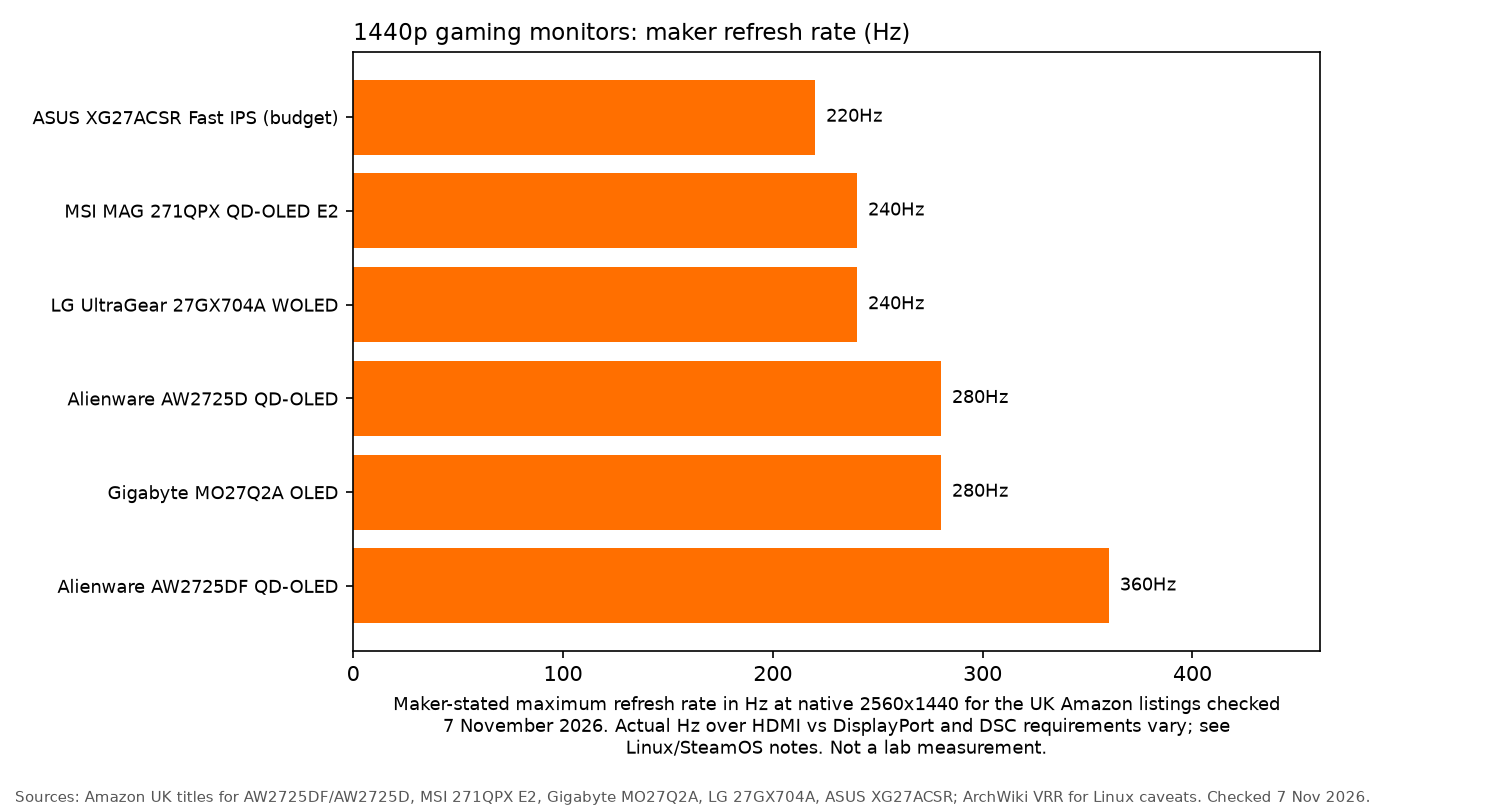
Chart caption: Maker-stated maximum refresh rate in Hz at native 2560x1440 for the UK Amazon listings checked 7 November 2026. Actual Hz over HDMI vs DisplayPort and DSC requirements vary; see Linux/SteamOS notes. Not a lab measurement. Sources: Amazon UK titles for AW2725DF/AW2725D, MSI 271QPX E2, Gigabyte MO27Q2A, LG 27GX704A, ASUS XG27ACSR; ArchWiki VRR for Linux caveats. Checked 7 Nov 2026.
The picks
Alienware AW2725DF: best competitive
Dell's specification lists a 26.7 inch QD-OLED, 2560x1440, and 0.03 ms grey to grey. Two DisplayPort 1.4 inputs are listed at 2560x1440 and 360Hz, with HDR and VRR. The HDMI port is labelled HDMI 2.1, and Dell limits that port to TMDS bandwidth: 2560x1440 at 144Hz, with HDR and VRR. TFTCentral reports the same 144Hz HDMI limit and describes the port as HDMI 2.0 bandwidth under a 2.1 label. The USB-C port is a downstream data port with charging. It is not a video input. The USB-C to DisplayPort cable in the box adapts a computer's USB-C output into the monitor's DisplayPort.
TFTCentral reports that the 360Hz DisplayPort timing uses DSC. A Dell community reply said firmware that might add a DSC control was being investigated, and that 360Hz would not remain if DSC were turned off. Dell's specification does not list a DSC on/off control, and it does not list a firmware download that adds one. This guide does not claim that a DSC toggle is available.
Who it is for: competitive FPS players whose GPU can hold very high frame rates, on a direct DisplayPort connection.
Who it is not for: anyone whose frame rate sits well below 360Hz, or anyone who must use HDMI or the official Steam Deck dock for the top refresh. The AW2725D is the calmer QD-OLED in that case. Dell does not list G-SYNC Compatible on this model. It lists FreeSync Premium Pro and VESA Adaptive Sync.
Linux note: use DisplayPort for 360Hz, then follow the AMD or Nvidia section of the ArchWiki. HDMI on this model stops at 144Hz. On a dock, the dock's own output has to be DisplayPort 1.4, or a USB-C port that can feed the monitor's DisplayPort. Valve's dock stops at 1440p 120Hz. Enable the OLED care features if a desktop panel stays on screen. That reduces burn-in risk. It does not remove it.
Offer check, 7 November 2026: the new offer was in stock and sold by Amazon. Dell lists 360Hz on DisplayPort and limits HDMI to 144Hz. Dell's specification does not list a DSC on/off control, and this guide does not claim that one is available.
Check price on AmazonAlienware AW2725D: best for most
Dell lists a 26.7 inch QD-OLED at 2560x1440 and 280Hz. DisplayPort 1.4 supports that timing with HDR, DSC and VRR. Two HDMI 2.1 FRL ports support 2560x1440 at 280Hz, 10-bit, HDR and VRR. USB-C is a downstream data port with up to 15W charging, not a display input. TechSpot's roundup says the same about the missing DisplayPort Alt Mode. VRR on the spec is FreeSync Premium Pro, G-SYNC Compatible and VESA Adaptive Sync. Alienware Command Center is listed for Windows.
Who it is for: most people who want QD-OLED and do not need 360Hz.
Who it is not for: players who want the highest refresh in this list, or a USB-C display input for a laptop dock. The MSI E2 and the XG27ACDNG do have USB-C video. This Alienware does not.
Linux note: the VRR path matches the AW2725DF, with the extra point that Dell does name G-SYNC Compatible here. HDMI 2.1 FRL can carry the full 280Hz, which the AW2725DF's HDMI port cannot. A Steam Deck dock still caps the chain at 1440p 120Hz.
Offer check, 7 November 2026: the UK listing showed new and used offers. Choose a new offer, not a used offer and not Amazon Resale. The featured seller was not confirmed, so do not assume this is sold by Amazon.
Check price on AmazonMSI MAG 271QPX QD-OLED E2: best value 240Hz
MSI's specification lists a 26.5 inch QD-OLED, 2560x1440, 240Hz and 0.03 ms grey to grey. DisplayPort 1.4a, HDMI 2.1 and USB-C with DisplayPort Alt Mode and 15W power delivery are all listed at 2560x1440 up to 240Hz. The English manual says the USB-C source and cable must support DisplayPort Alt Mode, and that DSC can be turned on or off in the OSD. MSI's FAQ says you need the latest firmware before DSC off will expose Nvidia DSR and DLDSR. FreeSync Premium Pro is the adaptive sync name on the spec page. MSI's overview also describes the HDMI 2.1 ports as 48 Gbit/s for console VRR.
Who it is for: players who want OLED motion at 240Hz, including a laptop that can send video over USB-C.
Who it is not for: anyone who needs 280Hz or 360Hz. The X28 is the faster MSI sibling. It is not the only MSI here with USB-C.
Linux note: set adaptive sync in the OSD, then use the ArchWiki for the driver and compositor. A dock must speak DisplayPort Alt Mode. If the dock keeps a high USB data rate, confirm the 240Hz timing instead of assuming it. OLED Care 2.0 is a monitor feature. MSI's Windows app is not required to read that menu.
Offer check, 7 November 2026: the in-stock offer was from the marketplace seller Wholesale Supplies. It was not sold by Amazon, and it was not labelled Amazon Resale. Confirm the unit is new.
Check price on AmazonMSI MAG 271QP QD-OLED X28: higher refresh MSI
MSI's X28 specification lists a QD-OLED at 2560x1440 and 280Hz, with HDMI 2.1, DisplayPort 1.4a (HBR3) and USB-C DisplayPort Alt Mode at 15W, each up to 280Hz. The product page calls the HDMI 2.1 connection full bandwidth, up to 48 Gbit/s. The manual's timing note says to use a graphics card that supports DSC if you want the monitor's full performance, and the OSD can switch DSC off. Adaptive sync on the spec is FreeSync Premium Pro and G-SYNC Compatible.
Who it is for: MSI buyers who want 280Hz and USB-C on one screen.
Linux note: MSI's manual says a DSC-capable GPU is needed for the monitor's full performance, and the OSD can switch DSC off. Treat 280Hz over DisplayPort 1.4a as a DSC mode until that control shows otherwise.
Offer check, 7 November 2026: Amazon UK listing B0F4KNZ9NB was currently unavailable. This button does not mean the monitor is in stock.
Check price on AmazonLG UltraGear OLED 27GX704A: best bright room
LG UK lists a 26.5 inch panel, marketed as 27 inch, at 2560x1440 and 240Hz, with a 0.03 ms grey-to-grey claim. The spec table says panel type OLED. The same page describes WOLED and Micro Lens Array+ (MLA+), and says SDR brightness is higher than the earlier MLA panel. DisplayPort 1.4 and HDMI 2.1 are both specified at up to 240Hz. There are two HDMI ports and one DisplayPort, plus a USB 3.2 upstream port and two downstream ports. There is no USB-C video input. G-SYNC Compatible and FreeSync Premium Pro are both named. LG's EU product information sheet lists a minimum of eight years of software and firmware updates. That is a support window, not a promise that a later firmware raises the refresh rate.
Who it is for: a desk in a bright room, where the WOLED and MLA+ brightness claims matter more than 280Hz or 360Hz.
Who it is not for: anyone who wants a refresh above 240Hz, or USB-C docking video.
Linux note: the listing and LG both say G-SYNC Compatible. ArchWiki still requires a 10-series or newer Nvidia GPU for that path, and a compositor that has VRR turned on. DisplayPort is the safer first connection. HDMI 2.1 is in LG's timing, but Valve's dock HDMI port is HDMI 2.0 and is specified only to 1440p 120Hz. Enable the OLED care tools for a static desktop.
Offer check, 7 November 2026: a new offer sold by Amazon was in stock, and a separate Amazon Resale offer was on the same page. Choose the new offer. Amazon Resale is not the new listing.
Check price on AmazonASUS ROG Strix XG27ACSR: best budget IPS
ASUS UK lists a 27 inch Fast IPS, 2560x1440, with a 220Hz maximum. The ports are DisplayPort 1.4 with DSC, HDMI 2.1 FRL, and USB-C DisplayPort Alt Mode with 15W. The signal table runs to 220Hz on USB-C, DisplayPort and HDMI. VRR is FreeSync Premium and G-SYNC Compatible. The 0.3 ms figure is a minimum response claim, with 1 ms grey to grey also listed. DisplayWidget Center is Windows software for the OSD.
Who it is for: a Linux desktop that keeps panels, docks and taskbars on screen all day, where OLED burn-in is the thing you do not want to manage.
Who it is not for: anyone who wants OLED contrast.
Linux note: VRR is still available. ArchWiki prefers DisplayPort, and this monitor's DisplayPort input is the one marked DSC.
Offer check, 7 November 2026: the in-stock offer was from the marketplace seller Realtime Distribution. It was not sold by Amazon, and it was not labelled Amazon Resale. Confirm the unit is new.
Check price on AmazonOther picks
ASUS ROG Strix XG27ACDNG
This is the other 360Hz QD-OLED, and the one with a real USB-C display input. ASUS UK lists 26.5 inch QD-OLED, 2560x1440, 360Hz, DisplayPort 1.4 with DSC, two HDMI 2.1 FRL ports, and USB-C DisplayPort Alt Mode with 90W power delivery. The signal table runs to 360Hz on all three. FreeSync Premium Pro and G-SYNC Compatible are both named. The manual says the USB-C port needs a source that supports DisplayPort Alt Mode, and that the Type-C bandwidth menu set to USB 3.2 is limited to 2560x1440 at 180Hz. Full refresh over USB-C means using the USB 2.0 data mode. DSC can be enabled or disabled, and the DisplayPort stream can be set to 1.2 or 1.4. A dock that insists on USB 3 data on the same cable will not pass 360Hz.
Linux note: check VRR in the Wayland compositor after the cable is right. DisplayWidget Center does not run the Linux setup. The manual documents a DSC control and a USB-C bandwidth menu. USB 3.2 mode on that port is limited to 2560x1440 at 180Hz.
Offer check, 7 November 2026: ASIN B08HLRSNS3 matched model 90LM0AN0-B01970 and the page showed as in stock, but the seller was not named. Do not assume it is sold by Amazon. A second ASIN for the same model was a third-party offer. Confirm this ASIN is a new unit.
Check price on AmazonGigabyte MO27Q2A
Gigabyte's UK specification lists the panel type as QD-OLED, 2560x1440, 280Hz and 0.03 ms grey to grey. That is the maker confirmation for the panel subtype. The chart under the comparison still labels the bar "OLED", which is the shorter Amazon title, not a second panel type. Connectivity is two HDMI 2.1 ports, DisplayPort 1.4, and USB-C Alternate Mode with power delivery up to 18W. The manual calls the DisplayPort input DP 1.4 HBR3 and lists 2560x1440 at 280Hz on HDMI, DisplayPort and USB-C. The OSD can turn DSC off, choose the HDMI version, and switch USB 3.2 support on Type-C. With USB 3.2 support off, the manual says Type-C falls back to USB 2.0. There is also a Type-C compatibility option for more mobile devices. Gigabyte's product page says G-SYNC Compatible, and the UK Amazon title says FreeSync Premium Pro.
Linux note: use the OSD for VRR and OLED care. Gigabyte Control Center is not the Linux path. If you dock over USB-C, try the compatibility and USB 3.2 switches before you conclude that 280Hz is missing.
Offer check, 7 November 2026: the listing was in stock in the fetch, and it was not labelled Amazon Resale. The seller was not named. Do not assume it is sold by Amazon. Confirm the offer is new.
Check price on AmazonASUS ROG Strix OLED XG27AQDMES
ASUS lists a 26.5 inch QD-OLED, 2560x1440, 240Hz, DisplayPort 1.4 with DSC, and two HDMI 2.1 FRL ports. The signal table runs to 240Hz on HDMI and DisplayPort. There is no USB-C video input on that spec. ASUS OLED Care is listed. The UK Amazon title adds G-SYNC compatible and OLED Care Pro.
Linux note: OLED care runs from the monitor.
Offer check, 7 November 2026: a new offer sold by Amazon was in stock, and an Amazon Resale offer was on the same page. Choose the new offer. Amazon Resale is not the new listing.
Check price on AmazonASUS ROG Strix OLED XG27AQWMG
ASUS lists panel type WOLED and panel technology Tandem WOLED, 26.5 inch, 2560x1440, 280Hz, a glossy TrueBlack surface, DisplayPort 1.4 with DSC, and two HDMI 2.1 FRL ports. The signal table runs to 280Hz on HDMI and DisplayPort. The spec I/O list has a USB hub and no USB-C video input. VRR on that page is Adaptive Sync. The UK Amazon title also says G-SYNC Compatible and FreeSync Premium Pro, and it calls the panel a TrueBlack glossy tandem OLED. ASUS OLED Care Pro includes a proximity sensor that can blank the panel when you leave. ASUS does not publish a Linux HDR note for this tandem panel, so do not assume HDR tone mapping matches Windows.
Linux note: confirm VRR in the compositor, and keep static panels hidden.
Offer check, 7 November 2026: the UK title matched this model. The seller was not named. Do not assume it is sold by Amazon. Confirm the offer is new and shipping to the UK.
Check price on AmazonGPU reality check
A high-refresh 1440p monitor only helps when the GPU can feed it. Competitive shooters reach high frame rates more easily than heavy single-player games. For the latter, 240Hz or 280Hz is the more sensible panel than 360Hz. VRR covers the gap when the frame rate falls, and lowering a few settings can close more of it. Driver choice on Linux is a separate decision: see the best GPU for Linux gaming guide for AMD, Nvidia and Intel Arc.
For a Steam Deck or another SteamOS device, read Valve's dock limits above before you buy a screen for its 240Hz or 360Hz number. Storage for the handheld is covered in the Steam Deck microSD guide.
FAQ
Is 1440p better than 4K for a high-refresh monitor?
For a high-refresh PC, 1440p leaves the GPU more frame rate than 4K. Whether that trade is worth it depends on the game. TechSpot's budget 1440p OLED roundup compares screens at this resolution, and the Linux GPU guide covers how much performance different cards keep under Proton.
Is 240Hz worth it at 1440p?
It is the rate most of these maker pages treat as a normal 1440p gaming mode, if the GPU can get near it. It is not automatically the cheapest option. Compare the current new listing with the 280Hz and 360Hz models rather than assuming a lower refresh costs less. Amazon prices are not printed on this page.
OLED or IPS for FPS?
OLED is the contrast and motion pick. The 0.03 ms figures are maker claims. IPS, here the ASUS XG27ACSR, is the pick when a Linux desktop keeps static panels on screen and you do not want to manage burn-in. Neither choice removes the need to check the port that actually carries the refresh rate.
Will my GPU drive 1440p at 240Hz?
It depends on the game and the settings. Competitive titles are the realistic target for the highest rates. VRR helps when the frame rate is lower. On Linux, the GPU guide compares AMD, Nvidia and Intel driver paths.
Does FreeSync or G-SYNC work on Linux?
Yes, with conditions. The ArchWiki VRR page says AMDGPU uses the FreeSync or VESA path, and that Nvidia G-SYNC Compatible monitors need a 10-series or newer card. DisplayPort is the usual connection. Some HDMI 2.1 displays also work, and Wayland compositors have their own settings. A badge on the box is not enough.
Do OLED monitors risk burn-in on a Linux desktop?
Static bars and docks are a burn-in risk. Turn on the maker's pixel shift, screen move or panel-care tools, and hide panels when you can. Those steps reduce risk. They do not remove it. Read the warranty for burn-in cover. If you would rather not manage that, the XG27ACSR Fast IPS is the non-OLED pick.
Can a Steam Deck dock run these monitors at full refresh?
Not at the panel maximum. Valve's dock page lists DisplayPort 1.4 and HDMI 2.0, up to 4K at 60Hz or 1440p at 120Hz, with FreeSync. Several monitors here also cut the rate on HDMI or when USB-C is in a high-speed data mode. Check the dock path, not only the sticker refresh.
More Linux gaming gear
More hardware guides: all gear guides, best mechanical keyboard for FPS gaming, best gaming mouse for Linux, best gaming headset for Linux, best controller for Linux gaming, best graphics card for Linux gaming and best microSD card for Steam Deck. Read how we review.