Best SSD for Linux Gaming
The best SSD for Linux gaming: NVMe picks for desktops, a 2230 drive for Steam Deck, a SATA option for older PCs, plus TRIM, firmware and filesystem notes.
Published . Updated . 11 min read.

The best SSD for Linux gaming is a 2TB PCIe 4.0 NVMe drive for most desktop players. The WD_BLACK SN850X is roomy enough for a decent Steam library. The Samsung 990 EVO Plus is the value pick, the Crucial P310 2230 suits a Steam Deck upgrade, and for PCs without M.2 the Samsung 870 EVO is a big step up from a hard drive.
On Linux, the brand matters less than capacity, using a native Linux filesystem for your Steam library and being able to update the drive's firmware. This is an aggregator guide. It uses the ArchWiki solid state drive page, the ArchWiki Steam page, the Proton wiki note on NTFS, Samsung's 990 EVO Plus data sheet, Samsung's 990 PRO brochure, Sandisk's SN850X data sheet, Samsung's 870 EVO newsroom specification, Tom's Hardware on the SN850X, Tom's Hardware on the P310, PC Gamer's P310 review, iFixit's Steam Deck SSD guide and the Amazon UK listings. We have not tested these drives ourselves.
Quick picks
- Best overall: WD_BLACK SN850X 2TB (PCIe 4.0, 1,200TBW on Sandisk's data sheet)
- Best value: Samsung 990 EVO Plus 2TB (TLC, host memory buffer, 1,200TBW on Samsung's data sheet)
- Best for big libraries: Samsung 990 PRO 4TB (4GB LPDDR4 and 2,400TBW on Samsung's brochure)
- Best for Steam Deck and handhelds: Crucial P310 2230 2TB
- Best for an older SATA PC: Samsung 870 EVO 2TB
We may earn a commission if you buy through links on this page. It never changes our verdicts. How we review.
WD_BLACK SN850X 2TB NVMe SSD
Check price on AmazonSamsung 990 EVO Plus 2TB
Check price on AmazonLinux gaming SSD chooser table
Capacity guides are OpenFrag's own. The SN850X listing says today's A-list titles can take up 200GB or more of storage, so 1TB fills quickly.
| Your machine | Pick | Form factor | Capacity guide | Linux notes |
|---|---|---|---|---|
| Gaming desktop with a spare M.2 slot | WD_BLACK SN850X or Samsung 990 PRO | M.2 2280, PCIe 4.0 | 2TB for most libraries | Format ext4; enable fstrim.timer |
| Budget desktop or second game drive | Samsung 990 EVO Plus | M.2 2280, PCIe 4.0 x4 or 5.0 x2 | 2TB | No DRAM on Samsung's data sheet. It uses a host memory buffer. Fine for games |
| Large library or several big games | Samsung 990 PRO 4TB | M.2 2280, PCIe 4.0 | 4TB | Samsung firmware via its ISO images, as the ArchWiki describes |
| Steam Deck or 2230 handheld | Crucial P310 2230 | M.2 2230 | 1TB or 2TB | iFixit says the Steam Deck LCD uses a single-sided 2230. Reinstall SteamOS after the swap |
| Older PC without M.2 | Samsung 870 EVO | 2.5-inch SATA | 1TB or 2TB | Samsung rates sequential read at up to 560MB/s |
| Dual-boot with Windows | Any of the above, as a separate Linux drive | Any | Keep a Linux library | The ArchWiki Steam page says Valve discourages NTFS for a Steam library |
Spec table
Checked 17 November 2026. Samsung and Sandisk endurance figures below are from those makers' documents. The P310 endurance, QLC and host memory buffer lines are from Tom's Hardware and PC Gamer, not from the UK listing.
| Drive | Interface | NAND and cache | Endurance | Sequential read |
|---|---|---|---|---|
| WD_BLACK SN850X 2TB | PCIe 4.0 NVMe, 2280 | Sandisk TLC 3D NAND. DRAM is not on the data sheet | 1,200TBW (Sandisk data sheet) | Up to 7,300MB/s (Sandisk data sheet) |
| Samsung 990 PRO 2TB | PCIe 4.0 NVMe, 2280 | TLC, 2GB LPDDR4 (Samsung brochure) | 1,200TBW (Samsung brochure) | Up to 7,450MB/s (Samsung brochure) |
| Samsung 990 PRO 4TB | PCIe 4.0 NVMe, 2280 | TLC, 4GB LPDDR4 (Samsung brochure) | 2,400TBW (Samsung brochure) | Up to 7,450MB/s (Samsung brochure) |
| Samsung 990 EVO Plus 2TB | PCIe 4.0 x4 / 5.0 x2, 2280 | TLC, host memory buffer (Samsung data sheet) | 1,200TBW (Samsung data sheet) | Up to 7,250MB/s (Samsung data sheet) |
| Crucial P310 2230 2TB | PCIe 4.0 NVMe, 2230 | QLC, host memory buffer (Tom's Hardware and PC Gamer) | 440TBW (Tom's Hardware and PC Gamer) | Up to 7,100MB/s (UK listing) |
| Samsung 870 EVO 2TB | SATA, 2.5-inch | 2GB LPDDR4 (Samsung newsroom) | 1,200TBW (Samsung newsroom) | Up to 560MB/s (Samsung newsroom) |
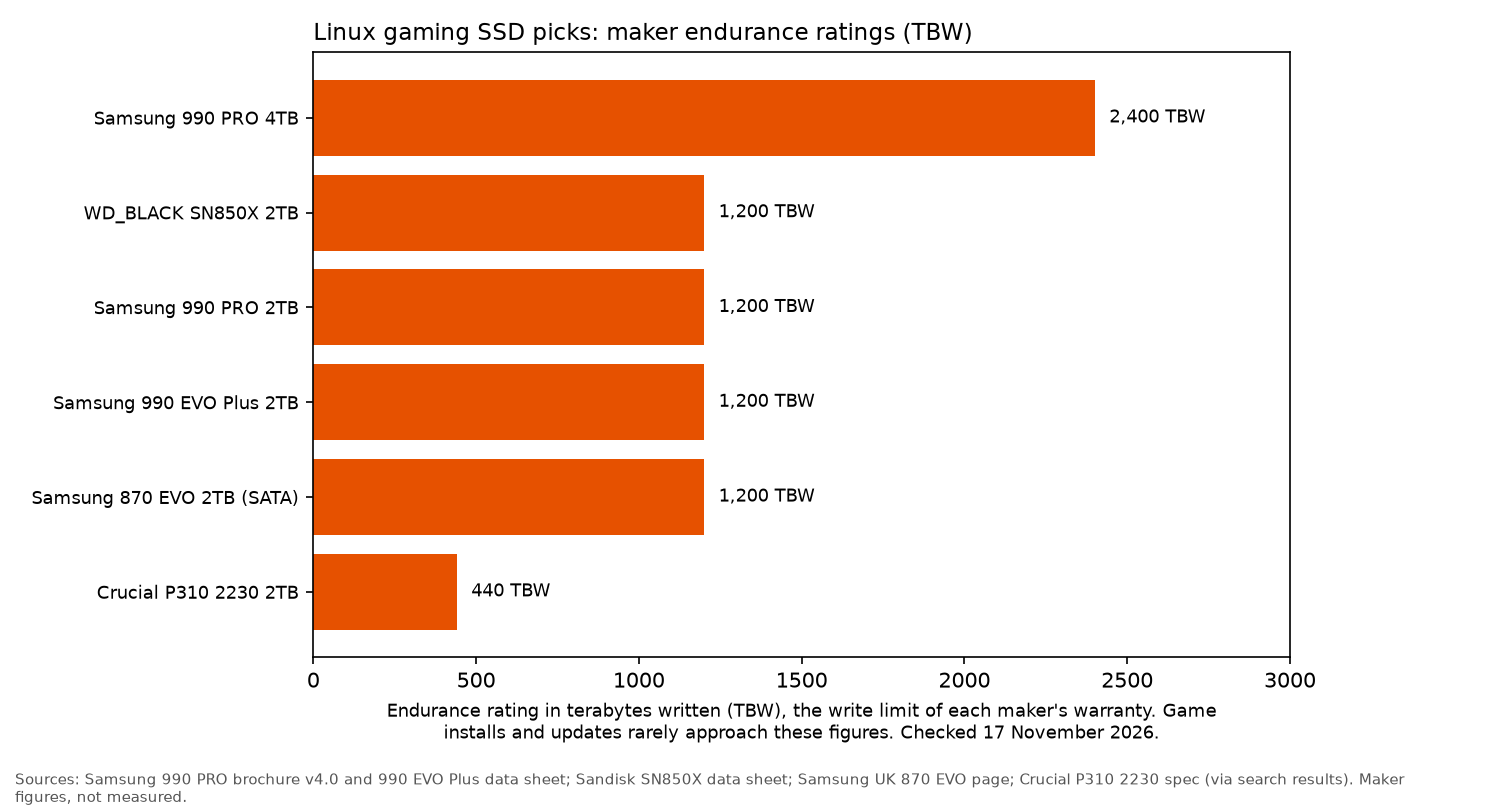
Chart caption: The bars match the spec table. Samsung 990 PRO 4TB 2,400TBW and 2TB 1,200TBW are from Samsung's 990 PRO brochure. WD_BLACK SN850X 2TB 1,200TBW is from Sandisk's data sheet. Samsung 990 EVO Plus 2TB 1,200TBW is from Samsung's data sheet. Samsung 870 EVO 2TB 1,200TBW is from Samsung's newsroom specification. The Crucial P310 2230 2TB bar is 440TBW, the figure in Tom's Hardware's specification table and in PC Gamer's review. That 440TBW figure is not on the UK listing. The chart image titles the set as maker ratings, and its source line already marks the P310 figure as via search results. Not an OpenFrag measurement. Checked 17 November 2026.
What matters when you choose
Capacity first. Running out of space hurts more than a slightly slower drive. Get 2TB if you can. The SN850X listing says today's A-list titles can take up 200GB or more of storage.
TLC and DRAM. Samsung's brochure lists TLC NAND with 2GB of LPDDR4 on the 990 PRO 2TB and 4GB of LPDDR4 on the 4TB. Sandisk's data sheet lists TLC 3D NAND for the SN850X and does not state a DRAM size. Tom's Hardware's review of the 2TB describes a DDR4 DRAM package, 2GB on the sample they opened. DRAM-less models borrow system memory through a host memory buffer. Samsung's 990 EVO Plus data sheet says that drive uses a host memory buffer. Tom's Hardware and PC Gamer say the same of the P310. That rarely matters for loading games, as that is mostly reads.
PCIe generation. A PCIe 4.0 SSD will work in a PCIe 3.0 slot, at the slower connection speed. Sandisk's data sheet says the SN850X is backwards compatible with PCIe Gen3. Samsung's 990 EVO Plus data sheet says that drive is backward compatible with PCIe 3.0 x4. Corsair's 2230 listing notes reduced performance on Gen3. There's little reason to spend extra on Gen5 for a game drive.
Endurance. TBW is the warranty's write limit. Normal game installs and updates are unlikely to come near these drives' limits. The figures in the table are the published ratings named there, not a measurement.
Heat and fit. Sandisk's data sheet lists a separate heatsink model for the SN850X, including the 2TB. A heatsink helps in a cramped case if there's room under your graphics card or motherboard cover. Many boards have their own M.2 heatsinks.
Linux setup
- Use ext4 for the game drive. It's the safest default. The ArchWiki shows Btrfs and XFS can take TRIM as well, so stick with whichever you know best.
- Avoid NTFS for the Steam library. The ArchWiki Steam page says Valve discourages NTFS for a Steam library, and that games will not start. The Proton wiki page it links to says the same, and that page describes itself as user-contributed rather than an official Valve guide. The ArchWiki also notes that exFAT is case-insensitive, which causes problems with Steam library folders.
- Add the drive as a Steam library folder in Steam's settings and mount it at boot with an fstab entry.
- Turn on TRIM. The ArchWiki says enabling
fstrim.timerrunsfstrimweekly. You can check drive support withlsblk --discard. - Update firmware. The ArchWiki recommends
fwupdwhere the manufacturer supports it. It also says Samsung and Crucial provide bootable ISO images, so those updates do not require Windows.
The picks
WD_BLACK SN850X 2TB
The WD_BLACK SN850X is a PCIe 4.0 SSD. Sandisk's data sheet gives the 2TB model Sandisk TLC 3D NAND, a sequential read up to 7,300MB/s and a 1,200TBW endurance rating. That sheet does not state a DRAM size. Tom's Hardware describes DDR4 DRAM on the 2TB sample, 2GB on the drive they opened. The data sheet lists separate heatsink and non-heatsink model numbers. The linked UK title does not say heatsink.
Who it's for: desktop gamers looking for a single fast drive to hold both Linux and their game library.
Who it isn't for: laptops that only accept 2230 or 2242 SSDs.
Check price on AmazonSamsung 990 PRO 2TB
Another strong PCIe 4.0 option. Samsung's brochure lists TLC NAND, 2GB of LPDDR4 and a 1,200TBW rating for the 2TB model, model code MZ-V9P2T0BW, with sequential read up to 7,450MB/s.
The ArchWiki says Samsung ships firmware updates as ISO images and explains running them on Linux.
Who it's for: players who prefer Samsung or want the 990 PRO's higher rated read speed on that brochure.
Who it isn't for: budget builds, where the EVO Plus is close enough for gaming.
Check price on AmazonSamsung 990 EVO Plus 2TB
Samsung's data sheet says the 990 EVO Plus uses TLC NAND and a host memory buffer in place of dedicated DRAM. The 2TB model supports PCIe 4.0 x4 or 5.0 x2, sequential read up to 7,250MB/s, and a 1,200TBW rating. The UK title matches the 7,250MB/s and the PCIe 4.0 x4 / 5.0 x2 line.
Who it's for: value-focused builds or adding a second drive dedicated to games.
Who it isn't for: heavy video editing involving long, sustained writes.
Check price on AmazonSamsung 990 PRO 4TB
The 4TB model, MZ-V9P4T0BW, is the same 990 PRO family. Samsung's brochure lists 4GB of LPDDR4 and 2,400TBW, with the same 7,450MB/s sequential read. It suits a large Steam library you'd rather not keep trimming.
Who it's for: players with large libraries or lots of games exceeding 100GB installed at once.
Who it isn't for: anyone who doesn't mind uninstalling games once they've finished them.
Check price on AmazonCrucial P310 2230 2TB
The UK listing names the Steam Deck, ROG Ally and MSI Claw, and a sequential read up to 7,100MB/s. It does not state NAND type, DRAM or TBW. Tom's Hardware's specification table and PC Gamer's review both describe the 2TB as QLC NAND with a host memory buffer rather than dedicated DRAM, and both give it a 440TBW rating.
That's lower than the TLC drives in this guide. iFixit's Steam Deck LCD guide says the Deck uses a single-sided M.2 2230, and it points to Valve's recovery instructions for putting SteamOS on the new drive.
Who it's for: Steam Deck owners who want 2TB of internal storage rather than relying on microSD.
Who it isn't for: desktop owners who can fit a 2280 SSD.
Check price on AmazonCorsair MP600 MINI 1TB (2230 alternative)
The Corsair MP600 MINI is another 2230 option. Its UK listing says high-density 3D TLC NAND, names the Steam Deck, and notes reduced performance on PCIe Gen3. It suits anyone who wants TLC in that listing's words and only needs 1TB.
Check price on AmazonSamsung 870 EVO 2TB
For PCs without M.2, the Samsung 870 EVO is a 2.5-inch SATA drive. Samsung's newsroom specification gives the 2TB model 2GB of LPDDR4 and a 1,200TBW rating, with sequential speeds up to 560MB/s read and 530MB/s write. The UK listing repeats 560/530MB/s.
That SATA ceiling is still a substantial improvement over a hard drive.
Who it's for: older PCs without an M.2 slot, or systems with a spare SATA bay for storing older games.
Who it isn't for: machines that still have a free M.2 slot.
Check price on AmazonPlanning a build or an upgrade? Read the Linux gaming guide, best GPU for Linux gaming, best Linux gaming laptop, best Steam Deck accessories and best microSD card for Steam Deck.
FAQ
Which SSD is best for Linux gaming?
For most players, a 2TB PCIe 4.0 NVMe SSD such as the WD_BLACK SN850X or Samsung 990 PRO is a good choice. Format it with ext4.
Is NVMe worth it for gaming?
Yes, provided your PC has an M.2 slot. Samsung rates the 870 EVO's SATA read at up to 560MB/s. The NVMe drives in this guide publish sequential reads several times that. Capacity still matters more than the headline speed.
How much storage do I need for a Steam library?
2TB is a sensible choice for most players. The SN850X listing says today's A-list titles can take up 200GB or more of storage, so space can disappear quickly.
Which filesystem for games on Linux?
Ext4 is the safest default for a Linux Steam library. The ArchWiki Steam page says to avoid NTFS, and it flags exFAT because that filesystem is case-insensitive.
Does DRAM-less matter?
Not much for loading games, which mainly involves reading data. Samsung's 990 EVO Plus data sheet uses a host memory buffer instead of DRAM, and Tom's Hardware says the same of the P310. The difference matters more during long, heavy writes.
More from OpenFrag: Gear · How we review